

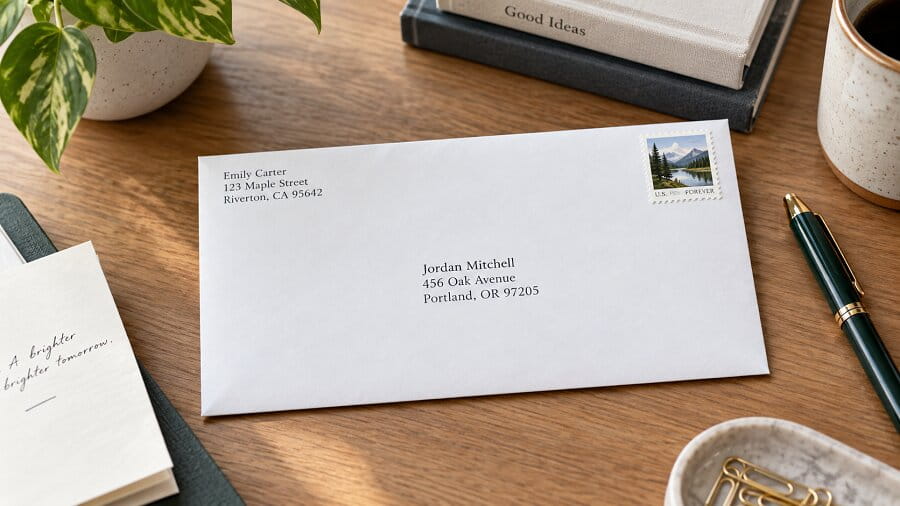
Properly addressing a letter means placing the recipient’s full name, street address, city, state, and ZIP code in the center of the envelope, with your return address in the upper-left corner and a stamp in the upper-right corner. Get any element wrong and your letter gets delayed, returned, or lost entirely. This guide covers every format, scenario, and tool you need to address letters correctly every time.
Why Addressing a Letter Correctly Matters
Postal sorting machines process millions of letters per day using optical character recognition. A missing apartment number, an incorrect ZIP code, or illegible handwriting bypasses automation and routes your letter to manual sorting — or straight back to you. For business correspondence, that delay can mean missed deadlines, lost contracts, or damaged professional relationships.
Beyond delivery speed, correct addressing signals respect and professionalism. A properly formatted envelope tells the recipient you took time and care before anything inside is read. In an era where emails dominate, a well-addressed physical letter stands out immediately.
The importance of first impressions applies offline too. Whether you’re sending a business proposal, a legal notice, or a personal note, the envelope is judged before the letter is opened.
The Anatomy of a Properly Addressed Envelope
Every standard envelope has three defined zones: the upper-left corner for your return address, the center-right area for the recipient’s delivery address, and the upper-right corner for postage. Postal machines are calibrated to read these zones in exact positions. Placing information outside these zones creates processing errors.
The delivery address in the center must be written in block capital letters with no punctuation, per current USPS machine-readability standards. Each line should be separated clearly. Never use decorative fonts, cursive script, or light ink colors for machine-processed mail.
Return Address Format
Your return address goes in the upper-left corner of the envelope. Use your full legal name or business name on the first line, your street address and unit number on the second line, and your city, state abbreviation, and ZIP+4 on the third line. This address is what the postal service uses to return undeliverable mail to you.
Recipient Address Format
The recipient’s address is centered on the envelope, roughly in the middle of the available space. Line one carries the recipient’s name with appropriate title. Line two carries the street address including suite or apartment number. Line three carries the city, state abbreviation, and ZIP code. For very large organizations, add the department name between the recipient’s name and the street address.
Step-by-Step: How to Address a Standard Business Letter Envelope
Start by holding the envelope horizontally with the flap facing away from you. This gives you a clean, unobstructed writing surface. Use a black or blue ballpoint pen or a printed label for maximum legibility. Never use pencil, gel pens in light colors, or markers that bleed through the envelope material.
Write or print your return address first in the upper-left corner. Keep the text small enough that it occupies no more than one-quarter of the envelope’s total surface. Then move to the center of the envelope and write the recipient’s name and address. Align text to the left within the center zone for machine readability. Finally, apply your postage stamp firmly in the upper-right corner without overlapping any printed areas.
Double-check every element before sealing. Verify the ZIP code against the USPS ZIP code lookup tool if you have any doubt. A single transposed digit in a ZIP code reroutes your letter to the wrong sorting facility and adds days to delivery.
Business Envelope Example
Here is a correctly formatted business envelope:
Return address (upper-left):
JOHN SMITH
ACME CORPORATION
123 MARKET STREET STE 400
CHICAGO IL 60601-2345
Delivery address (center):
MS SARAH JOHNSON
DIRECTOR OF OPERATIONS
XYZ ENTERPRISES LLC
456 LAKEVIEW BLVD APT 7B
BOSTON MA 02101-8822
Addressing Letters for Different Recipients and Situations
Standard formats shift depending on who you’re writing to. Titles, honorifics, and organizational hierarchies all affect how the first line reads. Getting these details right reflects both respect and attention to professional norms.
Addressing a Letter to a Doctor or Professional
Use the professional title before the name on the first line. For a physician, write “DR JAMES LEE MD” or simply “DR JAMES LEE” — both are acceptable. For attorneys, “JAMES LEE ESQ” is the traditional form. Never stack two titles before and after the name simultaneously, such as “DR JAMES LEE PHD” — pick one position for the credential.
Addressing a Letter to a Couple
Traditional etiquette for married couples uses “MR AND MRS DAVID PARKER” when both share a surname. For couples with different surnames, use separate lines or “MS ANNA CHEN AND MR DAVID PARKER” on a single line if space allows. For same-sex couples, list both names with equal title treatment: “MR DANIEL ROSS AND MR KEVIN FLORES.”
Addressing a Letter to a Company or Department
When writing to a specific department within a company, place the individual’s name first, then their title, then the department, then the company, then the address. Use “ATTN:” only if you do not know a specific person’s name. When you do know the name, the attention line is unnecessary and can look dated.
Addressing International Letters
For mail going outside the United States, the destination country name goes on the last line in capital letters, spelled out fully in English. Do not abbreviate country names on international mail — postal systems in destination countries may not recognize US-style abbreviations. Research the destination country’s local address format, as some countries place postal codes before city names, or place the province before the city.
When translating address components for international mail, always confirm with an official postal source rather than a general translation app, as postal terminology can differ significantly from everyday language.
Formal Letter Formats: Block, Modified Block, and Semi-Block
The internal layout of the letter itself follows specific formatting conventions depending on formality level. Three formats are standard in professional environments, each with distinct alignment rules.
Full Block Format
In full block format, every element — date, inside address, salutation, body, closing, and signature — aligns to the left margin. There are no paragraph indentations. Double spacing separates paragraphs. This is the most widely used format in modern business correspondence because it looks clean and is fast to type.
Modified Block Format
Modified block keeps most elements left-aligned but moves the date, closing, and signature block to the center of the page. Paragraph text remains left-aligned without indentation. This format projects a slightly more traditional, formal appearance than full block while still being straightforward to produce.
Semi-Block Format
Semi-block is the most formal of the three. It mirrors modified block in the placement of the date and closing, but each paragraph begins with a first-line indent of five spaces or a half-inch tab. This format is most common in legal correspondence and formal academic letters.
Salutations and Closings: Matching Tone to Context
The salutation opens your letter and sets its tone immediately. “Dear” followed by a title and surname is the universal standard for formal letters. Use a colon after the salutation in US business letters (“Dear Ms. Johnson:”) and a comma in personal correspondence (“Dear Jane,”). “To Whom It May Concern” works when the recipient is unknown, though “Dear Hiring Manager” or “Dear Customer Service Team” is more targeted and effective.
Closings must mirror the formality of your salutation. “Sincerely,” “Yours truly,” and “Respectfully” are appropriate for formal business letters. “Best regards,” “Kind regards,” and “With appreciation” work for semi-formal relationships. “Warmly” and “Best wishes” suit personal correspondence. Leave four blank lines between the closing phrase and your printed name for a handwritten signature.
Addressing Envelopes for Special Mail Types
Certified Mail and Registered Mail
Certified mail and registered mail require all standard address elements plus the specific service notation. Write “CERTIFIED MAIL” or “REGISTERED MAIL” in capital letters above the delivery address, or use the pre-printed adhesive labels provided at the post office. The tracking number label goes to the left of the delivery address area on the envelope.
PO Box Addresses
When addressing mail to a PO Box, the box number replaces the street address on line two. Never include both a street address and a PO Box on the same envelope — USPS delivers to whichever address appears above the city/state/ZIP line, so duplication creates confusion. Use “PO BOX 1234” in all-caps without punctuation.
Military Mail (APO/FPO/DPO)
Military addresses use unit designations in place of street addresses and APO (Army Post Office), FPO (Fleet Post Office), or DPO (Diplomatic Post Office) codes instead of city names. The two-letter state code for APO/AE (Europe/Middle East/Africa), APO/AP (Pacific), or APO/AA (Americas) replaces the standard state field. A ZIP code assigned to the unit replaces a civilian ZIP code. All other formatting rules apply.
Wedding Invitations and Formal Social Mail
Wedding invitation envelopes traditionally use handwritten addresses in formal calligraphy. Spell out all words fully: “Street” not “St,” “Avenue” not “Ave,” and state names in full rather than two-letter abbreviations. Inner envelopes (used in traditional wedding etiquette) carry only names, no address. Outer envelopes carry the full delivery address. When addressing to a guest and their partner, list both names on separate lines if the inner envelope is not used.
Best Tools and Services for Addressing Letters Correctly
Technology has significantly improved the accuracy and efficiency of letter addressing. Whether you need to validate a single address before mailing or process thousands of records for a bulk campaign, the right tool eliminates errors that cause returns, delays, and wasted postage.
Smarty — Best for Fast US Address Verification
Smarty is a CASS-certified address verification API that processes US addresses at up to 25,000 per second, making it the fastest option available for bulk validation. For individuals or small teams who don’t need an API, Smarty also offers a free paste-and-verify tool in the browser, a Microsoft Excel add-in, and a Google Sheets add-on that requires zero coding. The service flags undeliverable addresses, corrects formatting to USPS standards, identifies apartment-level accuracy, and assigns a persistent SmartyKey identifier to each verified record.
Price: Pay-per-lookup on annual or monthly subscriptions; no cancellation fees on month-to-month plans; free trial available.
Pros: Fastest throughput in the industry; works inside Excel and Google Sheets without coding; transparent pricing with no overage fees; rooftop geocoding available as an add-on.
Cons: US and international are separate products billed separately; no built-in mail-sending capability — verification only.
PostGrid — Best for Businesses with CRM Workflows
PostGrid combines CASS and SERP certified address verification with direct mail automation in a single platform. It validates US and Canadian addresses in real time and covers 245-plus countries via its international API. PostGrid integrates with major CRMs, including Salesforce and HubSpot, allowing address verification to happen automatically as new contacts enter your system rather than as a separate manual step. On G2, PostGrid holds a 5-star average across over 170 reviews.
Price: Custom pricing based on volume; free trial available.
Pros: Highest-rated address verification tool on G2; seamless CRM integration; covers US, Canada, and 245-plus international markets; includes mail printing and delivery automation.
Cons: No self-serve public pricing listed; overkill for individuals or very small senders who only need occasional single-address checks.
Melissa — Best for Enterprise and Global Data Quality
Melissa Global Address Verification has been in the address data business for nearly four decades and covers over 240 countries and territories with CASS certification, NCOA updates, real-time geocoding, and address autocomplete. It integrates directly with Salesforce, Microsoft Dynamics, and Shopify. Melissa also validates phone numbers and email addresses in the same platform, making it a comprehensive contact data quality solution for enterprise users.
Price: Pay-as-you-go from $40 per 10,000 credits; subscription plans start at approximately $5,145 per year for 1 million US lookups or $12,600 per year for global. A 42-day free trial with 1,000 free credits is available.
Pros: Nearly 40 years of data expertise; covers 240-plus countries; validates addresses, phones, and emails in one platform; real-time and batch processing available.
Cons: Pricing is complex and can be expensive for moderate volumes; credit system uses different rates for US vs. global addresses which creates budgeting confusion.
Lob — Best for Automated Direct Mail Campaigns
Lob is purpose-built for businesses that want to send physical letters, postcards, and checks at scale through an API. Address verification is included as part of its direct mail workflow rather than as a standalone product — when you submit a recipient’s address, Lob validates it against its CASS-certified database of 156 million-plus US addresses before printing. It also supports global addresses across approximately 240 countries. A free developer tier allows testing without commitment.
Price: Free developer plan for testing; Business and Growth plans available with volume-based pricing; address validation pricing not published separately.
Pros: Verification and mail sending in one workflow; strong API documentation; free developer access; supports postcards, letters, and checks; real-time address autocomplete for web forms.
Cons: Verification is an add-on to mail services, not a standalone tool; pricing is less transparent than competitors for pure verification use cases; not cost-effective if you only need address checking without sending mail.
MappyMail — Best for Sending One-Off Letters Without a Printer
MappyMail takes a completely different approach: it’s a map-based letter-sending service designed for individuals who want to send a physical letter without owning a printer, stamps, or envelopes. You search for the recipient’s address on an interactive map, confirm the location visually, type or paste your letter content, pay, and MappyMail handles printing, enveloping, and mailing from there. No account required.
Price: Starting from $1.60 per letter; no subscription required; pay per letter.
Pros: No printer, stamps, or envelopes needed; map-based address confirmation reduces typos; no subscription or account required; fast and simple for occasional senders.
Cons: Not suitable for bulk or business use; pricing per letter adds up at volume; limited customization compared to business mail platforms.
PostScan Mail — Best for Managing Incoming Mail Remotely
PostScan Mail solves the opposite problem: receiving and managing mail when you can’t be at a physical address. It provides a real street address at one of over 1,179 locations nationwide. Mail arrives at the facility, staff scan the front of each piece, and you receive a notification with a digital preview in your online dashboard. You then decide whether to have items opened and scanned, forwarded to any address worldwide, shredded, or archived.
Price: Starting from $10 per month; 30-day money-back guarantee.
Pros: 24/7 access to your mail from anywhere in the world; real street address (not a PO box); works with USPS, FedEx, UPS, DHL, and Amazon; useful for digital nomads, remote businesses, and expats.
Cons: Some users report processing delays during peak periods; mail mixing errors noted in a minority of reviews; not a letter-sending tool — receiving and managing only.
Common Letter Addressing Mistakes and How to Avoid Them
Even small errors in letter addressing create real delivery problems. The most frequent mistakes fall into a predictable set of categories that are easy to avoid once you know what to watch for.
Transposing digits in a ZIP code is among the most common errors. A ZIP code error reroutes your letter to the wrong sorting facility, adding days or causing return-to-sender. Always verify ZIP codes through USPS tools or a verified address validation service before printing labels or sealing envelopes. Similarly, using old addresses without confirming whether the recipient has moved leads to returns. NCOA (National Change of Address) processing, offered by tools like Melissa and PostGrid, automatically updates addresses against USPS move records before you mail.
Omitting the apartment or unit number is another major cause of misdelivery in urban areas. Large apartment buildings receive dozens of pieces of mail daily. Without a unit number, postal carriers have no way to deliver your letter correctly and will typically return it. When in doubt about a unit number, confirm it directly with the recipient rather than leaving the field blank.
Using outdated abbreviations or spelling out state names in full on machine-processed mail can also cause issues. USPS automated systems are calibrated for the standard two-letter state abbreviations (NY, CA, TX, and so on). Spelling out “New York” or “California” on a machine-read envelope can confuse OCR processing.
Handwritten addresses on business correspondence project an unprofessional image and introduce legibility risk. For any formal or business letter, use a printed label or a window envelope with your word processor’s mail merge feature. Mail merge in Microsoft Word lets you address hundreds of envelopes in minutes from a single contact list.
Postage: How Much Do You Need?
A standard #10 business envelope weighing up to 1 ounce requires one Forever Stamp for domestic US delivery. Each additional ounce adds postage. Non-standard envelope shapes — square, oversized, or rigid — incur a non-machinable surcharge on top of the base rate. International letters require Global Forever Stamps for most countries, but heavier items or unusual dimensions need postage calculated at the counter or via USPS online tools.
Affixing insufficient postage doesn’t simply slow your letter — postal services either return it to the sender or require the recipient to pay the difference, which creates a poor impression. Always weigh letters before mailing when there’s any doubt, particularly for multi-page documents or letters with enclosures like photographs or brochures.
You can buy postage stamps at post offices, grocery stores, pharmacies, and online through USPS.com. For frequent senders, a postage meter or an online postage service eliminates stamp management entirely.
Frequently Asked Questions
What is the correct order of information in a US mailing address?
The correct order for a US mailing address is: recipient name (line 1), company or organization name if applicable (line 2), street address with unit number (line 3), city followed by a comma and two-letter state abbreviation then ZIP code (final line). Never place the ZIP code on a separate line from the city and state.
Should I write addresses in capital letters?
USPS recommends all-capital letters on envelopes for optimal machine readability. While lowercase letters are processed successfully most of the time, all-caps eliminates any ambiguity for OCR systems, particularly for handwritten addresses. Printed labels in mixed case are generally fine since the font is uniform and machine-readable.
What is the correct way to address a letter to two people?
If both people share a surname, use “MR AND MRS DAVID AND ANNA PARKER” or “MR AND MRS DAVID PARKER.” If they have different surnames, list both names on the same line: “MS ANNA CHEN AND MR DAVID PARKER.” If space is limited, each name can go on its own line above the shared street address.
How do I address a letter when I don’t know the recipient’s gender?
Use the recipient’s full name without any title: “DEAR ALEX MORRISON:” works perfectly in formal correspondence. Alternatively, address the letter to the role rather than the person: “DEAR CUSTOMER SERVICE MANAGER:” or “DEAR HIRING COMMITTEE:” eliminates the gender question entirely while remaining professional.
What is the ZIP+4 code and do I need to use it?
The ZIP+4 code is a nine-digit postal code that adds four digits to the standard five-digit ZIP, identifying a specific delivery block, building, or organization. It is not mandatory for standard mail but improves delivery speed and accuracy, especially in dense urban areas. USPS ZIP code lookup tools provide the +4 extension for any US address.
Can I print addresses directly on the envelope?
Yes, and it’s actually preferred for business correspondence. Printing addresses directly on envelopes via mail merge or a label printer produces consistent, machine-readable output that outperforms handwriting in OCR accuracy. Most word processors, including Microsoft Word, support envelope printing directly from the print dialog with standard envelope size presets.
What happens if I use the wrong postage?
Mail with insufficient postage is typically returned to the sender if a return address is present. If no return address exists, the postal service may attempt to collect postage from the recipient on delivery. In either case, the letter is delayed and the situation reflects poorly on the sender. Always verify postage requirements for non-standard sizes or international mail before sending.
How far in advance should I mail an important letter?
Allow a minimum of five to seven business days for standard domestic First-Class Mail delivery. Priority Mail typically delivers in one to three business days. For time-sensitive documents, Certified Mail or Priority Mail Express provides tracking and guaranteed delivery windows. International mail timelines vary significantly by destination country, ranging from one to three weeks for most major markets.
Conclusion
Properly addressing a letter combines precision, etiquette, and the right supporting tools. From the placement of your return address to the correct format for military mail, every detail serves a function in ensuring your correspondence reaches its destination on time and in good standing. Use address verification tools when accuracy matters at scale, send through online services when convenience matters for one-off letters, and always double-check ZIP codes and unit numbers before sealing the envelope. A well-addressed letter is the first impression your correspondence makes — make it count.

Loading comments…