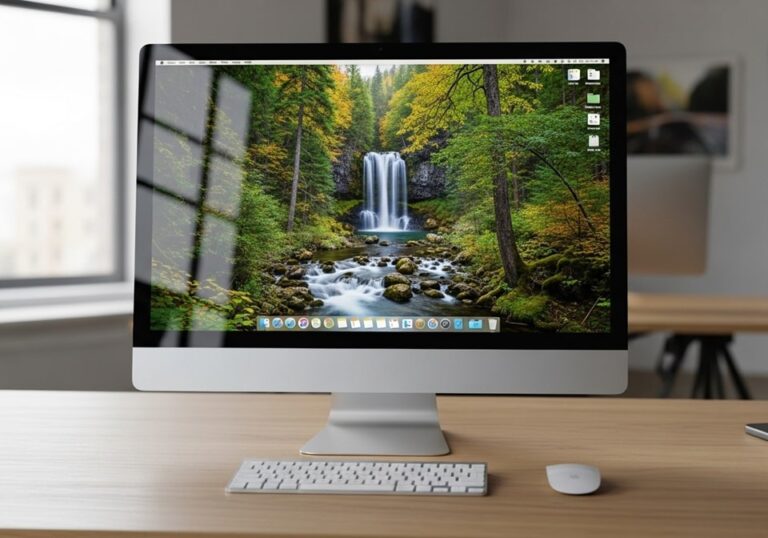
The Apple iMac with Retina 5K display remains a benchmark for all-in-one desktops, combining stunning visuals, powerful performance, and a sleek design. First introduced in 2014, the 27-inch iMac with Retina 5K display has undergone several updates, solidifying its reputation as a top choice for creative professionals and power users. This review covers its latest specifications, real-world performance, and how it stacks up against competitors in 2026.
With a resolution of 5120 x 2880 pixels, the Retina 5K display delivers unparalleled clarity and color accuracy, making it ideal for graphic design, video editing, and everyday use. The iMac’s integration of hardware and software ensures a seamless experience, while its premium build quality and user-friendly macOS ecosystem continue to set it apart. Whether you’re a professional or a casual user, the iMac with Retina 5K display offers a compelling blend of power and elegance.
In this article, we’ll explore the iMac’s display technology, performance capabilities, design, and value for money. We’ll also provide a detailed buying guide, pricing comparison, and answers to frequently asked questions to help you make an informed decision.
Display: A Visual Masterpiece
The 27-inch Retina 5K display is the centerpiece of the iMac, boasting a resolution of 5120 x 2880 pixels. This results in over 14.7 million pixels, offering four times the resolution of a standard 1080p display. The P3 wide color gamut and 500 nits brightness ensure vibrant, true-to-life colors, making it perfect for color-critical work such as photo and video editing. The anti-reflective coating reduces glare, enhancing the viewing experience in various lighting conditions.
The display’s high pixel density means text appears razor-sharp, and images are incredibly detailed. For professionals, this level of clarity is essential for accurate color grading and precise editing. Even for everyday tasks like browsing the web or watching movies, the Retina 5K display provides an immersive and comfortable experience.
Apple’s attention to detail extends to the display’s energy efficiency. Despite its high resolution, the Retina 5K display consumes up to 30% less energy than previous models, making it both powerful and eco-friendly. The use of oxide-based TFT technology reduces pixel crosstalk, ensuring sharp images from any viewing angle.
Key Display Features
- Resolution: 5120 x 2880 pixels (5K)
- Color Gamut: P3 wide color for richer, more accurate colors
- Brightness: 500 nits for clear visibility in bright environments
- Anti-reflective Coating: Minimizes glare and reflections
- Energy Efficiency: Up to 30% less energy consumption
- Viewing Angles: IPS technology for consistent colors from any angle
Performance: Powerhouse Under the Hood
The iMac with Retina 5K display is equipped with a range of high-performance components, including Intel Core i5, i7, and i9 processors, and dedicated AMD Radeon Pro graphics. These specifications ensure smooth multitasking and the ability to handle demanding applications such as Adobe Photoshop, Final Cut Pro, and 3D rendering software.
Memory and storage options are equally impressive. The iMac supports up to 128GB of DDR4 RAM, allowing for seamless multitasking and the ability to run virtual machines. Storage options include Fusion Drives and SSDs, with capacities up to 8TB. The Fusion Drive combines a traditional hard drive with a smaller SSD for a balance of speed and storage, while pure SSD configurations offer lightning-fast read and write speeds.
For connectivity, the iMac features Thunderbolt 3 ports, USB-A ports, an SDXC card slot, and a headphone jack. The inclusion of Thunderbolt 3 enables fast data transfers and the ability to connect multiple 4K displays or a single 5K display, expanding your workspace.
Performance Specifications
- Processors: Up to 10th-gen Intel Core i9 (10 cores)
- Graphics: AMD Radeon Pro 5700 XT with up to 16GB GDDR6 memory
- Memory: Up to 128GB DDR4 RAM (user-upgradable on 27-inch models)
- Storage: Fusion Drive (1TB to 3TB) or SSD (256GB to 8TB)
- Connectivity: Thunderbolt 3, USB-A, SDXC, Gigabit Ethernet
- Wireless: 802.11ac Wi-Fi and Bluetooth 5.0
Design and Ergonomics: Form Meets Function
The iMac’s design is iconic, with a sleek aluminum body and a razor-thin profile. The all-in-one design eliminates cable clutter, creating a clean and focused workspace. However, the stand only allows for tilt adjustment, which may not be ideal for all users. For those who need more flexibility, Apple offers a VESA mount adapter, allowing the iMac to be mounted on an adjustable arm or wall.
The rear placement of ports can be inconvenient for frequent plugging and unplugging of peripherals. Despite this, the iMac’s build quality and aesthetic appeal are unmatched, making it a stylish addition to any home or office.
The iMac runs on macOS, which is known for its stability, security, and seamless integration with other Apple devices. Features like Handoff, iCloud, and Continuity enhance productivity, allowing you to start a task on one device and finish it on another. The macOS ecosystem also provides access to a wide range of optimized applications, from creative tools to productivity software.
Pricing and Availability
As of February 2026, the Apple iMac with Retina 5K display is available in various configurations. Refurbished models start at $999, offering a more affordable entry point for those on a budget. Newer models with updated specifications are available directly from Apple and authorized retailers, with prices varying based on configuration.
Pricing Comparison (February 2026)
Apple iMac MK472LL/A 27-Inch Retina 5K Desktop (Refurbished)
- Processor: 3.2 GHz Intel Core i5
- Memory: 8GB DDR3
- Storage: 1TB Fusion Drive
- Price: $999 (Amazon, as of February 17, 2026)
- Best For: Budget-conscious buyers, students, and casual users
Apple iMac (27-inch, 2020) with Retina 5K Display
- Processor: 3.1 GHz 6-Core Intel Core i5
- Memory: 8GB (upgradable)
- Storage: 256GB SSD
- Price: $1,499 (Apple, authorized retailers)
- Best For: Professionals, creative users, and those needing a balance of performance and value
Apple iMac (27-inch, 2020) with Retina 5K Display (High-End Configuration)
- Processor: 3.8 GHz 8-Core Intel Core i7
- Memory: 16GB (upgradable)
- Storage: 512GB SSD
- Price: $2,299 (Apple, authorized retailers)
- Best For: Power users, video editors, and 3D artists
Competitor Comparison
The iMac with Retina 5K display faces competition from other all-in-one desktops, such as the Dell XPS 27 and HP Envy All-in-One. While these competitors offer similar specifications, the iMac’s display quality and macOS ecosystem give it a significant edge, particularly for creative professionals.
Dell XPS 27 All-in-One
- Display: 4K (3840 x 2160), touch-enabled
- Processor: Up to 10th-gen Intel Core i9
- Upgradeability: Limited, but more user-serviceable parts
- Price: $1,799
- Best For: Users who prefer Windows and need touch functionality
HP Envy All-in-One
- Display: 4K (3840 x 2160)
- Processor: Up to 11th-gen Intel Core i7
- Upgradeability: Very limited, sealed design
- Price: $1,299
- Best For: Budget-conscious users and general computing tasks
How to Choose the Right iMac for You
Selecting the right iMac depends on your specific needs and budget. Here are six key factors to consider:
- Display Requirements: If color accuracy and resolution are critical, the Retina 5K display is unmatched.
- Performance Needs: Choose a processor and graphics card that match your workflow. For video editing and 3D rendering, opt for higher-end configurations.
- Storage and Memory: SSDs offer faster performance, while Fusion Drives provide more storage at a lower cost. Consider upgrading RAM for future-proofing.
- Budget: Refurbished models offer excellent value, while new models provide the latest features and performance.
- Ergonomics: If adjustability is important, consider the VESA mount option.
- Ecosystem: If you’re already invested in the Apple ecosystem, the iMac’s integration with other Apple devices is a major advantage.
- Connectivity: Ensure the iMac has the ports and wireless capabilities you need for your peripherals and workflow.
Buying Guide: 6 Factors to Consider
- Intended Use: Determine whether you need the iMac for professional work, casual use, or a mix of both.
- Display Quality: The Retina 5K display is ideal for creative work, but a 4K display may suffice for general use.
- Processor and Graphics: Higher-end processors and dedicated graphics are essential for demanding applications.
- Storage and Memory: Opt for an SSD if speed is a priority, and consider upgrading RAM for multitasking.
- Upgradeability: The 27-inch iMac allows for RAM upgrades, which can extend its lifespan.
- Budget: Balance your needs with your budget, considering both new and refurbished options.
- Ecosystem: If you use other Apple devices, the iMac’s integration with macOS and iOS is a significant benefit.
Frequently Asked Questions (FAQ)
Is the iMac with Retina 5K display worth the investment?
The iMac with Retina 5K display is a premium all-in-one desktop that offers exceptional performance and display quality. For creative professionals and power users, the investment is justified by its capabilities and longevity. Casual users may find more affordable options suitable for their needs.
Can I upgrade the RAM on the iMac with Retina 5K display?
Yes, the 27-inch iMac with Retina 5K display allows for user-upgradable RAM, making it a future-proof choice. The 21.5-inch models, however, have soldered RAM and are not upgradable.
What is the difference between a Fusion Drive and an SSD?
A Fusion Drive combines a traditional hard drive with a smaller SSD for a balance of speed and storage. An SSD offers faster performance but is more expensive per gigabyte. For most professionals, an SSD is the preferred choice.
Does the iMac with Retina 5K display support external monitors?
Yes, the iMac supports up to one 5K external display or two 4K displays via its Thunderbolt 3 ports, expanding your workspace.
Is the iMac with Retina 5K display suitable for gaming?
While the iMac can handle casual gaming, it is not designed for high-end gaming. The dedicated AMD Radeon Pro graphics are powerful but not optimized for the latest AAA games.
Can I use the iMac with Retina 5K display as an external monitor?
No, the iMac with Retina 5K display does not support Target Display Mode, which allowed older iMacs to be used as external monitors.
What operating system does the iMac with Retina 5K display run?
The iMac runs on macOS, which is known for its stability, security, and seamless integration with other Apple devices.
Is the iMac with Retina 5K display energy efficient?
Yes, the Retina 5K display is designed to be energy efficient, consuming up to 30% less energy than previous models.
Where can I buy the iMac with Retina 5K display?
The iMac is available directly from Apple, authorized retailers, and online marketplaces such as Amazon and eBay. Refurbished models offer a more affordable option.
Conclusion
The Apple iMac with Retina 5K display remains a top choice for those seeking a powerful, all-in-one desktop with a stunning display. Its combination of performance, design, and ecosystem integration makes it ideal for creative professionals and power users. While the premium price may be a barrier for some, the iMac’s longevity and capabilities justify the investment.
Whether you’re editing high-resolution videos, designing graphics, or simply enjoying multimedia, the iMac with Retina 5K display delivers an unparalleled experience. With a range of configurations and the option to upgrade RAM, it is a versatile and future-proof choice for a wide range of users.

Full-stack developer at Scylla Technologies (USA), working remotely from Bangladesh. Adobe Certified Magento Developer.