

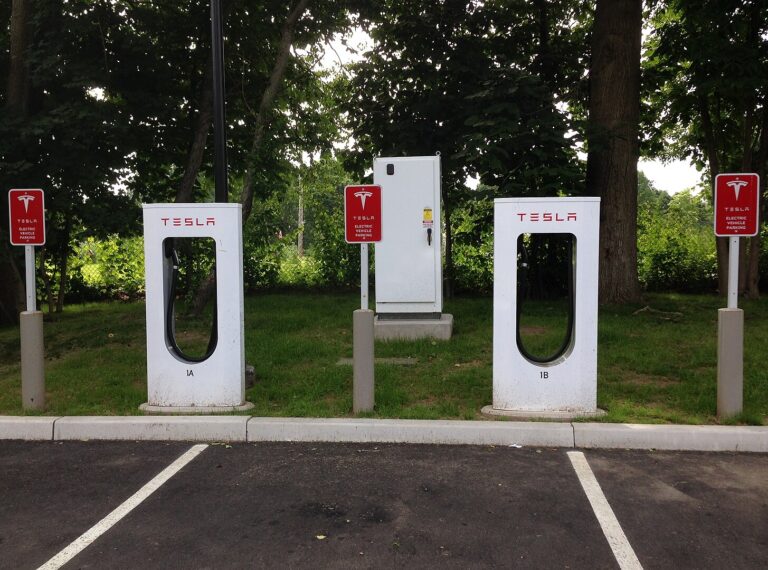
Tesla’s Supercharger network remains the gold standard for fast, reliable electric vehicle (EV) charging, with over 75,000 connectors worldwide as of 2026. Whether you’re a new Tesla owner or an experienced EV driver, understanding how to use Tesla Superchargers efficiently can save you time, money, and hassle. This guide provides a step-by-step walkthrough, up-to-date cost analysis, and expert tips to maximize your charging experience.
In 2026, the Supercharger network is more accessible than ever, supporting not only Tesla vehicles but also a growing list of non-Tesla EVs through adapters and Tesla’s “Magic Dock” technology. This guide covers everything from locating a Supercharger to troubleshooting common issues, ensuring you’re prepared for every charging scenario.
What Is a Tesla Supercharger?
A Tesla Supercharger is a high-speed DC fast-charging station designed to recharge Tesla and compatible EVs in minutes, not hours. Unlike standard Level 2 chargers, Superchargers deliver up to 325 kW of power, allowing you to add up to 200 miles of range in just 15 minutes under ideal conditions. The network is strategically located along major highways, in urban centers, and near amenities like restaurants and shopping centers, making long-distance travel and daily charging convenient.
As of 2026, Tesla operates over 7,900 Supercharger stations globally, with the majority in North America, Europe, and Asia. The network is expanding rapidly, with Tesla aiming to reduce the cost per stall to under $40,000 for its latest V4 Superchargers, which support even faster charging speeds and improved efficiency.
How to Use a Tesla Supercharger: Step-by-Step Guide
1. Locate a Supercharger
Finding a Supercharger is simple using your Tesla’s built-in navigation system or the Tesla mobile app. Here’s how:
- In Your Tesla: Tap the navigation screen, then select the Supercharger icon (lightning bolt) to view nearby stations. The map will display real-time availability, charging speeds, and stall types (e.g., V3, V4, or urban chargers).
- In the Tesla App: Open the app and tap “Charge” to see a map of Superchargers, including occupancy status, pricing, and amenities. You can also filter by charging speed or compatibility with non-Tesla vehicles.
- Third-Party Apps: Apps like PlugShare, ChargePoint, and A Better Routeplanner (ABRP) provide additional details, such as user reviews, photos, and alternative charging options.
2. Prepare Your Vehicle
Before arriving at a Supercharger, ensure your Tesla is ready for a smooth charging session:
- Check Your Tesla Account: Your vehicle must be linked to a Tesla account with a valid payment method. Supercharging is no longer free for most vehicles, so verify your payment details in the Tesla app under “Payments.”
- Update Your Software: Ensure your Tesla’s software is up to date. Some features, like automatic charge initiation or 3D Supercharger site maps, require the latest firmware.
- Plan Your Charge: Use the Trip Planner feature in your Tesla’s navigation to optimize your route. The system will automatically include Supercharger stops and adjust charge levels based on your destination.
3. Park and Plug In
Once you arrive at the Supercharger:
- Park Correctly: Align your charging port with the Supercharger cable. Tesla stalls are designed for easy access, but improper parking can block adjacent stalls or damage the cable.
- Open the Charge Port: Press the button on the Supercharger handle or use the Tesla app/vehicle touchscreen to open the charge port door.
- Connect the Cable: Insert the CCS (Combined Charging System) or NACS (North American Charging Standard) connector into your vehicle’s charging port. The car will automatically initiate charging if your account is set up correctly.
- Monitor the Session: Your Tesla’s touchscreen will display the charging status, including current charge level, estimated time to full, and cost per kWh. You can also monitor progress remotely via the Tesla app.
4. Optimize Your Charging Session
To make the most of your Supercharger visit:
- Charge to 80% for Speed: Superchargers deliver the fastest charging rates between 10% and 80% battery. Charging beyond 80% slows significantly due to battery chemistry, so plan accordingly for long trips.
- Avoid Idle Fees: Tesla imposes idle fees (typically $0.50–$1.00 per minute) if your vehicle remains connected after charging is complete and the station is busy. Move your car promptly once charging finishes.
- Use Off-Peak Hours: Some Superchargers offer lower rates during off-peak hours (e.g., late at night). Check the Tesla app for dynamic pricing at your selected station.
- Take Advantage of Amenities: Many Supercharger locations are near restaurants, restrooms, and shopping centers. Use the Tesla app to see nearby amenities and plan your break.
5. End Your Session
When you’re ready to leave:
- Stop Charging: Tap “Stop Charging” on your vehicle’s touchscreen or in the Tesla app. Alternatively, press and hold the button on the Supercharger handle for 3 seconds to release the cable.
- Return the Cable: Neatly coil the cable and place it back on the Supercharger post to avoid damaging it or creating hazards for other users.
- Check Your Receipt: The Tesla app will provide a summary of your session, including total cost, energy delivered, and duration. Review this to ensure accuracy.
Tesla Supercharger Costs and Pricing in 2026
Supercharging costs vary by location, time of day, and vehicle model. Here’s what to expect in 2026:
Pricing Models
- Per kWh: Most Superchargers bill by the kilowatt-hour (kWh), with rates ranging from $0.25 to $0.60 per kWh depending on the region and demand. Urban areas and high-traffic locations tend to be more expensive.
- Dynamic Pricing: Tesla has expanded live pricing to over 550 Supercharger sites, where rates fluctuate based on station utilization, local electricity costs, and time of day. For example, prices may drop to $0.25/kWh overnight but rise to $0.50+/kWh during peak hours.
- Idle Fees: If you leave your vehicle connected after charging is complete and the station is 50% or more occupied, you’ll incur idle fees. These fees encourage turnover and ensure availability for all drivers.
Estimated Charging Costs by Model
Charging costs depend on your Tesla’s battery size and efficiency. Below are approximate costs for a full charge (10% to 100%) at an average rate of $0.35/kWh:
- Tesla Model 3 (Standard Range): ~50 kWh battery, $17.50 for a full charge (263 miles of range).
- Tesla Model Y (Long Range): ~75 kWh battery, $26.25 for a full charge (330 miles of range).
- Tesla Cybertruck: ~120 kWh battery, $42.00 for a full charge (340+ miles of range).
- Tesla Model S (Plaid): ~100 kWh battery, $35.00 for a full charge (396 miles of range).
For comparison, charging at home typically costs $0.10–$0.20/kWh, making Superchargers 2–4 times more expensive but far more convenient for road trips.
Tesla Supercharger Network Updates for 2026
The Supercharger network is evolving rapidly. Here are the latest developments as of 2026:
Expansion and Accessibility
- Non-Tesla Access: Tesla has opened over 20,000 Supercharger stalls to non-Tesla EVs in North America, Europe, and Asia. Brands like Ford, GM, Rivian, Lucid, BMW, and Stellantis (Jeep, Dodge, Chrysler) now offer adapters or software updates to enable Supercharger compatibility.
- Magic Dock and NACS Adapters: Tesla’s Magic Dock (built-in CCS adapter) and NACS (North American Charging Standard) adapters allow non-Tesla EVs to charge without additional hardware. For example, BMW and Lucid owners can now use Superchargers with an approved adapter.
- New Stations: Tesla is deploying V4 Superchargers, which support up to 350 kW and are more compact, enabling faster rollouts in urban areas. The network is also expanding into new markets, including Japan and South Korea.
Software and Feature Updates
- 3D Supercharger Site Maps: Tesla’s navigation now includes 3D maps of Supercharger stations, showing stall availability, charger types, and even which Tesla models are currently charging.
- Automatic Charge Initiation: For Tesla vehicles, charging starts automatically when you plug in, provided your account is linked. Non-Tesla users may need to authenticate via the Tesla app or a credit card tap.
- Live Pricing and Congestion Management: Tesla’s dynamic pricing system adjusts rates in real time to reduce congestion and encourage off-peak charging. The Tesla app now displays live pricing for all Supercharger locations.
Pro Tips for Using Tesla Superchargers
Maximize your Supercharger experience with these expert tips:
- Pre-Condition Your Battery: If your battery is cold, use the “Precondition Battery” feature in the Tesla app before arriving at a Supercharger. This warms the battery for faster charging, especially in cold weather.
- Use Trip Planner for Road Trips: Tesla’s Trip Planner automatically routes you to Superchargers and calculates the optimal charge level for your journey. Trust the system—it accounts for elevation, weather, and traffic.
- Avoid Charging to 100%: Unless necessary, stop at 80% to save time and reduce battery wear. Superchargers slow significantly after 80%, and frequent full charges can degrade your battery over time.
- Check for Free Supercharging: Some Tesla models (e.g., early Model S/X owners) still have free Supercharging credits. Check your Tesla account for details.
- Report Issues Promptly: If a Supercharger is out of order, report it via the Tesla app. Tesla’s service team prioritizes repairs to minimize downtime.
- Plan for Non-Tesla EVs: If you drive a non-Tesla EV, ensure you have the correct adapter (e.g., Lectron Vortex Plus for BMW) and that your vehicle’s software is updated for Supercharger compatibility.
- Monitor Your Session Remotely: Use the Tesla app to start, stop, or monitor your charging session from a distance. This is especially useful if you’re grabbing a meal or running errands nearby.
- Be Mindful of Peak Hours: Superchargers are busiest Friday evenings, weekends, and holidays. Plan your trips to avoid long waits, or use the app to check stall availability in real time.
Frequently Asked Questions (FAQ)
1. How much does it cost to use a Tesla Supercharger in 2026?
Prices range from $0.25 to $0.60 per kWh, depending on location, time of day, and demand. Dynamic pricing means rates can change hourly, so always check the Tesla app for real-time pricing.
2. Can non-Tesla EVs use Superchargers?
Yes! As of 2026, Ford, GM, Rivian, Lucid, BMW, Stellantis (Jeep, Dodge), and others can access Tesla Superchargers using NACS adapters or Magic Dock stations. Check your vehicle manufacturer’s guidelines for compatibility.
3. How do I pay for Supercharging?
Tesla owners are billed automatically via the payment method linked to their Tesla account. Non-Tesla users can pay via the Tesla app or by tapping a credit card at the Supercharger (where available).
4. What is an idle fee, and how can I avoid it?
Idle fees ($0.50–$1.00 per minute) apply if your vehicle remains connected after charging is complete and the station is busy. To avoid fees, move your car promptly once charging finishes.
5. How fast can I charge my Tesla at a Supercharger?
Charging speeds depend on your vehicle and the Supercharger version:
- V3 Superchargers: Up to 250 kW (adds ~75 miles in 5 minutes).
- V4 Superchargers: Up to 350 kW (adds ~200 miles in 15 minutes for compatible vehicles like the Cybertruck).
- Urban Superchargers: Up to 72 kW (slower but convenient for city dwellers).
6. Can I reserve a Supercharger stall?
No, Supercharger stalls are first-come, first-served. However, the Tesla app shows real-time availability, so you can plan your arrival accordingly.
7. What should I do if a Supercharger isn’t working?
If a Supercharger is out of service, try another stall at the same location. If all stalls are down, report the issue via the Tesla app, and Tesla’s service team will prioritize repairs.
8. Are there any free Supercharging options left?
Most free Supercharging programs have ended, but some legacy Tesla owners (e.g., early Model S/X buyers) may still have annual free credits. Check your Tesla account for details.
9. Can I charge my Tesla to 100% at a Supercharger?
Yes, but charging slows significantly after 80%. For daily use, Tesla recommends stopping at 80% to preserve battery health and save time.
10. How do I find the cheapest Supercharger near me?
Use the Tesla app to compare real-time pricing at nearby stations. Off-peak hours (late at night or early morning) often have the lowest rates.
Conclusion
Tesla’s Supercharger network is the backbone of long-distance EV travel, offering unmatched speed, reliability, and convenience. By following the steps in this guide—locating stations, preparing your vehicle, optimizing your session, and understanding costs—you can make every Supercharger visit efficient and stress-free.
As the network continues to expand and evolve, stay informed about new features, pricing changes, and non-Tesla access to get the most out of your EV experience. Whether you’re a Tesla owner or drive a compatible non-Tesla EV, the Supercharger network is your gateway to seamless electric travel in 2026 and beyond.

