Understanding exactly how and when you can use a PS4 controller with a PS5 can save you time, avoid headaches, and help you get the most out of your existing gear. This guide walks you step-by-step through what works, what doesn’t, and how to get your controller connected correctly.
What’s compatible: PS4 controller on PS5 — quick reality check
Your PlayStation 5 (PS5) does support your DualShock 4 — the wireless controller from the previous-generation PlayStation 4 (PS4). However, the compatibility comes with important restrictions. You can use DualShock 4 on PS5 only when playing games designed for PS4. You cannot use it to play native PS5 games. That limitation exists because PS5 titles are built to take advantage of newer controller features — features the older DualShock 4 simply doesn’t support.
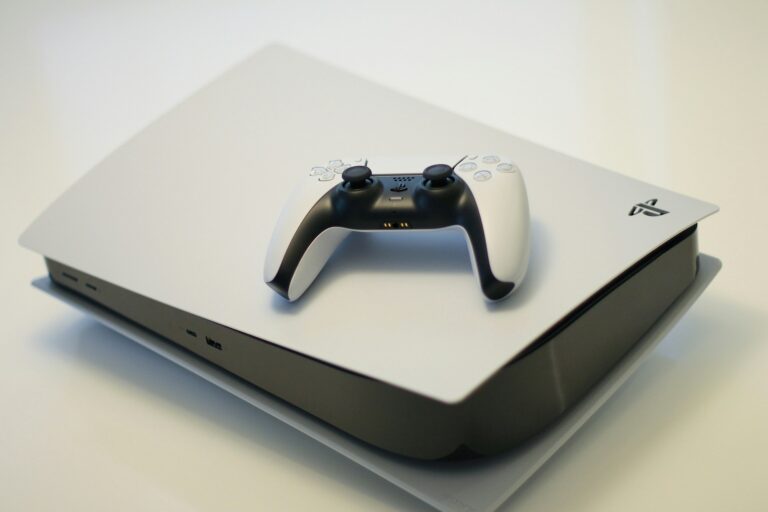
Here’s the bottom line: yes — you can reuse a PS4 controller on PS5; but only for PS4 games, not for PS5 games. If you want full compatibility across everything, you’ll need the newer DualSense controller.
Why the limitation exists
- PS5 games rely on controller-specific features — like advanced haptics, adaptive triggers, pressure-sensitive triggers, and other modern controls — which only DualSense offers. DualShock 4 lacks those, so PS5 games simply block it.
- The developers and platform maintainers want to maintain a consistent baseline experience across all players of PS5 games. Since older controllers don’t support the full feature set, Sony enforces the requirement of DualSense for PS5 titles.
- If you’re playing PS4 games (even from disc or backwards compatible versions), DualShock 4 works just like it did on PS4 — no fancy extras, but full compatibility.
How to connect a DualShock 4 controller to your PS5
Connecting a PS4 controller to your PS5 is straightforward. Here’s how to do it — wired or wireless.
Wired connection (easiest and most reliable)
- Grab a Micro-USB cable (the same kind used with PS4). Plug the cable into your DualShock 4 controller, and the other end into one of the USB ports on your PS5 console.
- Turn on the PS5. Press the PlayStation button (the center “PS” button) on the DualShock 4. The console should automatically detect it and prompt you to assign the controller to a user profile. Choose a profile and complete pairing.
- Once paired, you can unplug the cable — the controller should continue working wirelessly.
Wireless (Bluetooth) connection
- Ensure the DualShock 4 is powered off. Then press and hold the “Share” button + PlayStation button simultaneously, until the controller’s light bar flashes rapidly (pairing mode).
- On the PS5, navigate to *Settings → Accessories → Bluetooth Accessories.* Wait until “DualShock 4” appears in the list of available devices.
- Select it and press “X” — the PS5 will register the controller and assign it to your profile. From then on, it will operate wirelessly.
Either method — cable or Bluetooth — will let you use your old PS4 controller to play compatible games on PS5. Just don’t expect it to work with PS5-only titles.
What works — and what doesn’t — when using DualShock 4 on PS5
✅ What works
- Playing PS4 games on PS5: Your DualShock 4 will work as expected. Whether you own a PS4 disc or use a digital version, if the game is a PS4 title, you’ll be able to play with no major issues.
- Media apps & system navigation: For browsing menus, using Netflix, streaming apps, or using PS5 as a media center, the DualShock 4 is perfectly functional. That makes it useful as a spare controller for non-gaming use.
- Multiplayer/co-op PS4 games: If you want to play PS4 games with friends on your PS5, having DualShock 4 controllers lying around can make co-op simple and cheap.
❌ What doesn’t work
- PS5 games: Officially blocked. If you try to launch a PS5-only title using DualShock 4 you will get a warning and will not be able to proceed. PS5 games require DualSense.
- Advanced PS5 controller features: Since DualShock 4 lacks newer hardware (adaptive triggers, haptic feedback, motion sensors, etc.), using it — even with PS4 games — means you miss out on newer features that are becoming standard for PS5 developers.
- Mixed controller expectations: Some modern titles may have UI prompts, control layouts, or features designed with DualSense in mind. Using DualShock 4 may mean you’ll need to mentally translate or re-map controls.
Special cases & notable exceptions
There’s one notable exception: if you use streaming or remote-play workarounds, you might be able to use a PS4 controller in more situations — though with some caveats.
- Remote Play or streaming: If you stream your PS5 game to another device (for example, using a PC, phone, or tablet) and pair your DualShock 4 to that device, you may be able to use the controller for PS5 gameplay via Remote Play. That means the console sees you as streaming, not as playing offline — which sidesteps the “PS5 game controller requirement”. This is more of a workaround than an official feature.
- VR titles / PS VR accessories: Some PS4-era accessories and third-party licensed peripherals (e.g. certain gamepads, PS Move controllers) remain compatible when playing supported PS VR games on PS5 — but only under the same limitation: controller works only for PS4-era titles/compatibility layers.
Why you might still want to use a DualShock 4 — and when it makes sense
Even with limitations, there are still valid reasons to hold on to, or repurpose, your PS4 controller instead of immediately buying a second DualSense. Here’s when using a DualShock 4 on PS5 makes practical sense:
- Cost-saving for backward-compatible play: If you mostly play PS4 games (especially less demanding ones, indies, older titles), it’s often unnecessary to invest in a DualSense — DualShock 4 works fine.
- Secondary controller for multiplayer or guests: When playing couch co-op, local multiplayer, or sharing with friends/family, using a spare DualShock 4 gives a zero-cost extra controller.
- Media and non-gaming use: For streaming apps, navigating menus, or general media control on your PS5, DualShock 4 is more than adequate.
- Preference or comfort reasons: Some players simply prefer the ergonomics or feel of the DualShock 4 — lighter controllers, simpler layout, less “bulky” than DualSense. If you disdain adaptive triggers or heavy haptics, sticking with DualShock 4 can be more comfortable.
When you should definitely switch to DualSense (or PS5 controller)
Although DualShock 4 remains useful, there are strong arguments to use a PS5 controller — the DualSense — especially if you want to fully embrace what PS5 has to offer. Consider upgrading the controller when:
- You mainly play PS5-exclusive games — or plan to. Since DualShock 4 is not allowed for those, DualSense is mandatory.
- You care about immersive features: adaptive triggers, haptic feedback, motion controls, built-in mic, and other PS5-era enhancements make a significant difference in modern titles.
- You want consistent compatibility across all titles — no confusion about “Will this controller work or won’t it.” With DualSense, you avoid the PS4-vs-PS5 game compatibility issue entirely.
- You want to future-proof your setup. As more PS5 games appear and fewer PS4 games remain in active development, having DualSense ensures you’re ready for upcoming titles.
Step-by-Step: Best Practices for Using DualShock 4 on PS5
If you decide to use your PS4 controller on PS5, here are best practices and tips to make the experience smoother and avoid common pitfalls.
- Use a quality micro-USB cable: For wired connection, ensure the cable supports data transfer (not just charging). Cheap or charge-only cables might power the controller but not pair it properly.
- Initial pairing first via cable: Many users recommend first pairing the controller with USB; once recognized, you can then switch to Bluetooth so you avoid pairing troubles.
- Keep PS4 game version installed if available: If a game has both PS4 and PS5 versions, choose the PS4 version to ensure DualShock 4 compatibility. Some games default to PS5 version, which will block DualShock 4 use.
- Have DualSense as backup: If you plan to switch between PS4 and PS5 games, keep a DualSense controller ready — constantly re-plugging or changing controllers can get tedious.
- Use DualShock 4 for non-gaming use: Designate the PS4 controller for streaming, apps, media control, or casual old-school games — leaving DualSense reserved for serious gaming sessions.
Potential drawbacks of relying on DualShock 4 for PS5 console use
While DualShock 4 is supported in many ways, there are trade-offs you should be aware of if you choose to use it long-term with your PS5.
- No access to PS5-specific tech: As mentioned, triggers, haptics, adaptive feedback, and other innovations simply won’t work. That can make newer games feel “less alive.”
- Inconsistent UI/game version issues: Some games might default to PS5 version on your console, making them unplayable with DualShock 4 unless you manually select the PS4 version. This adds friction and can lead to confusion or wasted time.
- Poor long-term support: As developers target DualSense by default, fewer games will prioritize or test DualShock 4 compatibility — potentially leading to bugs or degraded experience down the line.
- Reduced resale or future compatibility: As the PS5 generation matures, third-party accessories and future consoles may phase out older controllers entirely. Relying on DualShock 4 may limit your options.
Conclusion
Using a PS4 DualShock 4 controller with a PS5 is absolutely possible — and for many users, entirely practical. If your main goal is to play backward-compatible PS4 games, use your PS5 as a media hub, or simply need a spare controller for local co-op or casual use, DualShock 4 offers a free, functional, and convenient option. The connection process is straightforward via USB or Bluetooth, and pairing takes only minutes.
However, it’s critical to understand the limitations: DualShock 4 will not work for native PS5 games, and you’ll miss out on the modern controller features that define the PS5 experience. For full access to PS5 libraries, future titles, and best overall gameplay experience, the DualSense controller remains essential — particularly for new releases designed around its advanced capabilities.
In short: yes — PS4 controllers still have a place, but for serious PS5 gaming, consider them a stop-gap or backup. If you want to fully leverage what your PS5 offers now and for the next several years, DualSense (or equivalent PS5-compatible controller) is the way to go.

Full-stack developer at Scylla Technologies (USA), working remotely from Bangladesh. Adobe Certified Magento Developer.