

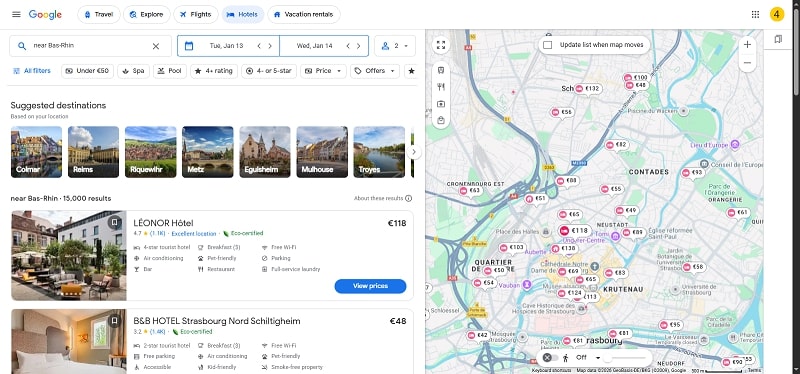
Planning a trip involves many details, but securing the right hotel is often the cornerstone of a successful experience. While numerous platforms exist for this task, Google has evolved into a comprehensive hub that aggregates information, compares prices, and even facilitates booking, all from a single starting point. This guide will delve into the advanced methods, strategic filters, and expert tips you need to transform a simple Google search into a powerful tool for finding your ideal accommodation.
Mastering Google’s hotel search is more than typing a city name. It’s about understanding how to navigate the ecosystem effectively, whether you’re on the classic Search page, the dedicated Google Travel platform, or within Google Maps. Each interface offers unique advantages, from broad overviews to location-specific insights. The goal is to move from a list of options to a confident booking by leveraging the vast amount of data Google organizes for you.
The process begins before you even hit “search.” Clarifying your priorities—be it budget, location, amenities, or travel style—will dramatically shape and speed up your search results. This initial step is crucial for filtering out noise and focusing on hotels that genuinely meet your needs, saving you hours of scrolling through irrelevant options.
Choosing Your Search Platform: Google Search, Travel, or Maps?
Google provides several entry points for finding hotels, each tailored for different stages of the planning process. Knowing which tool to use and when can make your research both efficient and thorough.
Google Search: The Quick and Comprehensive Starting Point
Initiating a search on google.com is the most common and direct method. Simply typing phrases like “hotels in Barcelona” or “New York City hotels this weekend” will trigger a specialized hotel search widget at the top of the results page. This widget is a powerful mini-application that allows you to input dates, number of guests, and apply initial filters without leaving the search page. It provides a high-level snapshot of options and prices, making it perfect for initial discovery and price checks when your plans are still flexible.
Google Travel: The Dedicated Trip-Planning Hub
For a more immersive planning experience, navigate directly to google.com/travel. This platform is designed as a holistic trip organizer. The “Hotels” tab here offers a richer interface with more granular filtering options and better tools for comparing longer lists of properties. A key advantage of Google Travel is its ability to save trips, track price changes for flights and hotels, and explore curated destination guides. It’s the ideal platform when you are seriously comparing options for a specific, planned trip.
Google Maps: The Location-Centric Lens
When the neighborhood is your top priority, Google Maps is your best friend. Searching for hotels within the map interface allows you to visualize exactly where each property is situated relative to key landmarks, public transit hubs, restaurants, and attractions. You can drag the map to explore different districts and see prices and ratings update in real-time for the visible area. This method is invaluable for travelers who want to be within walking distance of specific sites or who need to understand the geography of an unfamiliar city before booking.
Regardless of the platform you start with, your search will be built on a few core pieces of information. Accurately defining these parameters from the outset is the most effective way to get relevant results.
Defining Your Core Search Criteria
Every successful hotel hunt begins with clear parameters. Google’s systems use this initial data to pull the most relevant listings and accurate prices for your specific situation.
- Destination: Be as specific as possible. Instead of just “Japan,” try “Kyoto, Japan” or even “Gion District, Kyoto.” You can search for landmarks too, like “hotels near Times Square.” Specificity helps Google understand your geographic focus and provide better-suited options.
- Dates: Your check-in and check-out dates are perhaps the most critical variables. Prices and availability fluctuate daily based on demand, local events, and seasonality. Always use the date selector tool; searching without dates will only show you average or sample prices, which are rarely accurate for your actual trip.
- Guest Configuration: Honestly input the number of adults, children, and their ages. This is not just a formality. It ensures the search results only show rooms that can legally and comfortably accommodate your group and provides accurate total prices that include any extra person or child fees.
- Room Count: If you need more than one room (e.g., for families or groups traveling together), specify this. It adjusts the pricing display to show the total cost for all rooms, giving you a realistic picture of your total accommodation expense.
Once you’ve entered these basics, you’ll be presented with a list of potential hotels. This is where the real work begins—refining that list from dozens of possibilities to a handful of perfect contenders.
Mastering Filters to Narrow Your Perfect Match
Google’s filtering system is the engine that powers a precise search. Moving beyond the basic price and star rating sliders to the advanced filters is what separates a novice search from an expert one.
Essential Filters for Every Search
Start with the broad strokes to eliminate obviously unsuitable options. The price filter is your primary budgetary guardrail, but remember to check if the prices shown are per night or for the entire stay. The star rating filter gives a rough indication of the hotel’s service level and amenities, though standards can vary by country. The guest rating filter (e.g., “8+ Excellent”) is often more revealing than star ratings, as it reflects real traveler experiences.
Advanced and Strategic Filters
This is where you tailor the search to your personal travel style. The amenities filter is incredibly powerful. Beyond basics like free Wi-Fi and pools, look for filters like “air conditioning” (critical in certain climates), “pet-friendly,” “airport shuttle,” or “free breakfast”—these can significantly impact both your budget and convenience.
The neighborhood or district filter is crucial for urban destinations. Being in the right area can save hours in transit. Use this in conjunction with Google Maps to verify proximity to the places you plan to visit most.
For longer stays or work trips, filters like “kitchenette” or “laundry facilities” can be game-changers. Business travelers might prioritize “business center” or “free parking” if renting a car.
Analyzing Search Results and Hotel Details
With your filters applied, you’ll have a curated list. Now, you must learn to read between the lines of each listing to make an informed comparison.
Decoding the Hotel Listing Snippet
Each result shows a thumbnail, name, rating, and a starting price. Pay close attention to the “starting from” price—this is usually for the cheapest room type on the least expensive night of your stay. The actual price for your selected dates and room type will be shown on the next page. The review score and count (e.g., “8.5/10 · 1,247 reviews”) provide a credibility metric; a 9.0 with 50 reviews is different from an 8.5 with 2,000 reviews.
Diving Deep into the Hotel Details Page
Clicking on a listing opens a wealth of information. Scrutinize the photos and, if available, the virtual tours. Look for user-uploaded photos in addition to the professional shots to get a more realistic sense of room conditions. The amenities list is exhaustive; use Ctrl+F (or Cmd+F on Mac) to search the page for specific needs like “hair dryer” or “24-hour front desk.”
The location on the embedded map is vital. Zoom out to see what’s around—is it in a quiet area or a noisy nightlife district? Is there a subway station nearby? Use the “What’s nearby” feature to see distances to key points of interest.
Most importantly, read the recent guest reviews. Filter reviews by keywords like “clean,” “bed,” “noise,” or “staff.” Look for recurring themes rather than outlier rants or raves. A common complaint about slow Wi-Fi across multiple reviews is a reliable data point.
The Booking Process: Comparing Prices and Understanding Policies
Google is primarily a meta-search engine. It doesn’t own the inventory; it aggregates prices from various booking sites and the hotels themselves. This presents both an opportunity and a point of caution.
Understanding Your Booking Options
On the hotel’s details page, you’ll see a price comparison table from various Online Travel Agencies (OTAs) like Booking.com, Expedia, and Agoda, as well as a potential link to the hotel’s own website. Prices can differ substantially. While OTAs sometimes offer bundle discounts or member rates, the hotel’s direct website might offer perks like free breakfast, room upgrades, or more flexible cancellation terms for the same price.
Critical Pre-Booking Checklist
Before clicking “book,” conduct this final audit. Verify the exact room type (e.g., “city view queen bed” vs. “standard queen”) and what amenities it includes. Read the cancellation policy verbatim—is it free cancellation until 48 hours before, or is it non-refundable? Check for mandatory fees like resort fees, city taxes, or parking charges that are added at checkout. These are not always included in the initial price quote.
Pro Tips from Experienced Travelers
Leveraging these advanced strategies can lead to better prices, better rooms, and a much smoother booking experience.
- Embrace Date Flexibility: Use the “Flexible dates” calendar view on Google Travel. Often, shifting your stay by just one or two days can result in significant savings, especially if you move from a weekend to a weekday.
- Leverage Price Tracking: On Google Travel, you can save hotels you’re interested in and toggle on “Track prices.” Google will then email you if the price drops for your saved dates, giving you a chance to rebook at a lower rate.
- Incognito Mode Myth and Reality: While persistent cookies can sometimes affect displayed prices, a more reliable tactic is to clear your browser cookies or try searching in a different browser if you suspect dynamic pricing is inflating quotes on repeated searches.
- Consider Alternative Neighborhoods: Staying just outside the main tourist center can offer better value, quieter stays, and a more authentic local experience, often with excellent public transport links. Use the map search to explore these adjacent areas.
- Book Direct for Complex Stays: For long stays, special requests (like adjoining rooms), or trips during major events, calling the hotel directly after finding it on Google can sometimes yield unpublished rates or guarantees that OTAs cannot offer.
Frequently Asked Questions
Is it safe to book through the links on Google Hotel search?
Yes, the links direct you to reputable, major booking sites or the hotel’s official website. However, you are not booking with Google itself. Always ensure the final URL in your browser is the legitimate website of the OTA or hotel before entering payment information. Look for the padlock symbol (https://) in the address bar.
Why does the price change when I click from the list to the details page?
The list shows a “starting from” price for the most basic room. On the details page, you are shown the price for your specific dates, guest count, and the default room selection. Taxes and fees may also be more accurately calculated at this stage, causing a difference from the initial estimate.
How accurate and unbiased are the Google hotel reviews?
Google reviews are submitted by users with Google accounts and are generally considered reliable. Google has policies against fake reviews, but as with any platform, it’s wise to read a mix of positive and negative reviews and look for detailed, verified stay comments rather than brief, generic praise.
Can I use Google Hotel search for vacation rentals or apartments?
While primarily focused on traditional hotels, Google does integrate some vacation rental listings from major providers. For a comprehensive search of vacation rentals, you will still need to use specialized platforms like Airbnb or Vrbo directly, as their full inventory is not displayed on Google.
Conclusion
Searching for hotels on Google is a skill that merges clear travel planning with smart digital tool usage. By strategically choosing your platform, meticulously defining your criteria, and mastering advanced filters, you can cut through the clutter of online travel information. The key lies in moving beyond a simple price check to a thorough analysis of location, genuine guest feedback, and the fine print of booking terms. Remember to compare final prices across multiple sites, leverage tools like price tracking and flexible date calendars, and never underestimate the value of a direct call to the hotel for complex needs. Armed with this comprehensive approach, you can transform the often-daunting task of hotel booking into a confident and efficient process, ensuring your accommodation becomes a highlight of your journey, not just a place to sleep.
