
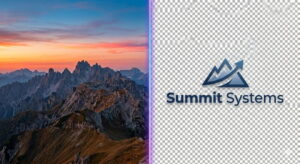
The question of whether to save an image as a JPEG or a PNG is one of the most fundamental decisions in digital content creation. It is a choice that pits file size against fidelity, speed against sharpness.
For photographers, web designers, and e-commerce managers, getting it right affects page load times, search engine ranking, and the professional polish of your brand. While both formats have been the workhorses of the internet for decades, understanding their core mechanical differences—and how those differences apply to modern use cases—is more critical than ever in 2026.
At its simplest, the decision comes down to content. The JPEG format, using lossy compression, is engineered to create small file sizes by permanently discarding image data that the human eye is less likely to notice .
This makes it the default choice for complex photographic scenes. Conversely, the PNG format utilizes lossless compression, preserving every pixel of the original image to maintain absolute clarity, which is essential for graphics with text, sharp lines, or transparent backgrounds . Choosing incorrectly can mean the difference between a site that loads instantly and one that frustrates users, or between a crisp logo and one surrounded by an unsightly white box.
The Technical Breakdown: Compression, Color, and Clarity
To truly understand which format is “better,” we have to look under the hood. The Joint Photographic Experts Group (JPEG) format was created in 1992 with a specific goal: to make photographic files small enough to travel over dial-up connections .
It achieves this by analyzing an image and grouping pixels together. If there is a blue sky, for instance, the algorithm doesn’t store every single blue pixel; it stores a block of “blue” and estimates the slight variations. This process is adjustable.
At a quality setting of 90% or 100%, the estimation is very accurate, resulting in a file that is nearly indistinguishable from the original but still smaller . Crank the compression down to 60%, and the file shrinks dramatically, but you risk introducing “artifacts”—blocky distortions or blurry patches—especially in high-contrast areas like text on a sign.
The Portable Network Graphics (PNG) format was born out of necessity in the mid-90s as a patent-free alternative to GIF, but it quickly surpassed its predecessor . PNG uses lossless compression, which works more like a ZIP file. It finds patterns and redundancies to shrink the file size, but when the image is decompressed for viewing on your screen, every single pixel is restored exactly as it was. This makes PNG files significantly larger than their JPEG counterparts. A PNG also supports two critical technical features JPEG lacks: alpha channel transparency and gamma correction . Alpha transparency allows for millions of levels of opacity, enabling smooth, feathered shadows and anti-aliased text edges to sit seamlessly over any background color or pattern. Gamma correction ensures that the brightness and color of the image remain consistent across different displays, from Macs to PCs to mobile screens .
JPEG: The Photographer’s Choice for Web and Print
For anyone dealing with full-color scenes, subtle lighting, and complex textures—such as a fashion photographer, a real estate agent showcasing a property, or a food blogger—JPEG remains the undisputed king. Its ability to handle 16.8 million colors (24-bit color) while maintaining a manageable file size is unmatched by lossless formats for this specific use case . When you upload a portfolio or a product shot to a site like Shopify or a social media platform, the platform’s own systems often re-compress images; starting with a well-optimized JPEG gives you more control over the final look .
However, the “lossy” nature of JPEG introduces significant limitations. It is a destructive format for iterative editing. Every time you open a JPEG, make a change, and save it again, you re-apply the compression algorithm, discarding more data and gradually degrading the image quality . This is known as generation loss. For this reason, professional photographers never use JPEG as an archival or working master. They shoot in RAW and export to JPEG only for final delivery. Furthermore, JPEGs struggle with high-contrast edges. Text in a screenshot, the sharp lines of a company logo, or monochrome line art can look “crunchy” or blurry when saved as a JPEG because the compression algorithm smooths out the abrupt transitions between black and white .
Pros of JPEG:
JPEG offers an adjustable compression ratio that lets users balance quality and file size, making it highly flexible for different platforms . It is universally compatible with every browser, device, and software application, ensuring that images can be viewed anywhere without issue . For photographic images with smooth gradients and millions of colors, it delivers exceptional quality at a fraction of the size of other formats.
Cons of JPEG:
Because it uses lossy compression, even high-quality JPEGs discard some data, meaning they are technically never as pristine as the original . The format does not support any form of transparency, making it impossible to layer images without a solid background . Repeated editing and re-saving leads to cumulative quality degradation, introducing noise and blur with each generation .
PNG: The Designer’s Essential for Graphics and Transparency
PNG is the lingua franca of the graphic designer. If you are building a website’s user interface, creating a logo, or taking a screenshot for a tutorial, PNG is the only logical choice. The format was built for the screen. It preserves the pixel-perfect precision required for icons, badges, and diagrams, ensuring that text remains crisp and borders remain sharp . The support for transparency is the key differentiator here. A logo saved as a PNG can be placed on a gradient background, a textured surface, or a solid color without the unsightly white box that a JPEG would force .
This lossless nature also makes PNG the ideal “working format.” If you are designing a complex infographic in Adobe Photoshop or Figma and you need to save a version to send to a colleague for feedback, PNG ensures that every layer of information and every pixel of detail remains untouched, even if the file is opened, edited, and re-saved multiple times . The trade-off, of course, is the file size. A PNG-24 version of a photograph can be two to five times larger than a visually similar JPEG, which can bog down a website if used indiscriminately .
Pros of PNG:
PNG uses lossless compression, meaning image quality never degrades, no matter how many times the file is edited and saved . It supports multi-level transparency via an alpha channel, allowing for smooth blending and soft shadows that overlay seamlessly on any background . The format preserves sharp edges and solid colors perfectly, making it superior for text, line art, and screenshots where clarity is paramount . It also includes gamma correction to ensure color accuracy across different devices and screens .
Cons of PNG:
Full-color PNG files are significantly larger than equivalent JPEGs, which can negatively impact website loading speeds and consume more storage space . The format does not support the CMYK color model used in professional printing, rendering it unsuitable for high-end print production . It also lacks native support for animation, unlike GIF or modern video formats .
Head-to-Head: Web, Photography, and Print Showdown
For the Web: A Tale of Two Speeds
When optimizing a website, performance is paramount. Google’s core web vitals penalize slow-loading pages, making file size a direct ranking factor. In this arena, JPEG is the workhorse for any large, background, or lifestyle image . A JPEG hero image can load in milliseconds, contributing to a smooth user experience. However, the visual elements that make a site feel professional—the logo in the header, the social media icons, the call-to-action buttons—must be in PNG format to ensure they look razor-sharp on high-DPI (Retina) displays and blend perfectly with the site’s color scheme . Modern best practices often involve using a Content Delivery Network (CDN) or platforms like Cloudinary that can automatically convert uploaded PNGs to next-gen formats like WebP or AVIF on the fly, delivering the quality of PNG with the size of JPEG .
For Photography: Archiving vs. Sharing
For the professional photographer, the choice is hierarchical, not binary. The original camera file is always a RAW or TIFF . For an editing master file where layers and adjustments need to be preserved, PSD or TIFF are used . But for delivering a gallery to a client or uploading to a portfolio, JPEG is the standard because of its efficient color reproduction and manageable size . PNG-24 could theoretically be used for photos, but the massive file size offers no appreciable benefit in image quality for this purpose—it just wastes bandwidth.
For Print: The CMYK Barrier
This is where both formats hit a wall. Neither JPEG nor PNG supports the CMYK color space, which is the standard for commercial printing (cyan, magenta, yellow, black) . If you send a PNG to a print shop for a brochure, the colors will shift dramatically because the printer has to convert the RGB data. For professional print work, formats like TIFF, PDF, or PSD are required as they support CMYK and offer higher bit depths for better color accuracy . However, for local, high-quality photo printing at home or a kiosk, a high-resolution (300 DPI) JPEG at 100% quality will produce excellent results .
Frequently Asked Questions
Is PNG always higher quality than JPEG?
Technically, yes. Because PNG uses lossless compression, it retains every bit of original data, while JPEG discards data. However, “quality” is subjective and contextual. For a photograph displayed on a screen, a high-quality JPEG (90%+) is visually indistinguishable from a PNG, but the PNG will load much slower . PNG is undeniably higher quality for graphics with text, logos, or sharp lines, where JPEG compression artifacts become noticeable .
Can I convert a JPEG to a PNG to get better quality?
No. Converting a lossy format (JPEG) to a lossless format (PNG) does not restore the data that was already discarded during the JPEG compression . You are simply taking a lower-quality image and wrapping it in a bigger file. The result is a large, slow-loading PNG that looks exactly like the compressed JPEG.
Why does my JPEG look blurry after I save it a few times?
This is the nature of lossy compression. Every time you edit and re-save a JPEG, the compression algorithm re-applies, discarding more data each time . This cumulative degradation is known as “generation loss.” To avoid this, always edit images in a lossless format like PNG or PSD, and only export the final version as a JPEG.
Which format is best for social media?
For photographs on platforms like Instagram, Facebook, or X (Twitter), JPEG is the standard . These platforms heavily compress images anyway, so starting with a smaller, optimized JPEG gives you more control. For profile pictures, cover images, or any graphic that includes your logo, upload a PNG to ensure the text and branding remain sharp and the background remains transparent if required.
Does PNG or JPEG support animation?
Standard JPEG files do not support animation. Standard PNG files also do not natively support animation, though an extension called APNG (Animated PNG) exists and offers full-color, lossless animation but is less commonly supported than GIFs . For most web animation needs, GIF or lightweight video formats (like MP4) embedded as HTML5 video are preferred.
What is WebP, and should I use it instead?
WebP is a modern image format developed by Google designed to replace both JPEG and PNG. It offers superior compression, creating files 25-35% smaller than JPEG while maintaining similar quality, and it supports transparency . The best practice in 2026 is to use WebP as your primary format and provide JPEG/PNG fallbacks for older browsers .
Can I print a PNG file?
Yes, you can physically print a PNG file, and because it is lossless, it will contain a lot of detail. However, because PNG does not support the CMYK color model, the printed colors may not match what you see on your screen . For professional, color-critical printing, TIFF or PDF are better options .
Why is my PNG file so large?
PNG files are large because they retain every pixel of information. Unlike JPEG, which throws away data you supposedly “can’t see,” PNG keeps it all . This is why PNGs are recommended for graphics with limited colors and sharp lines, where the file stays relatively small, but are overkill for complex photographs with millions of colors.
Conclusion
The battle between JPEG and PNG is not about declaring a single winner, but about understanding the specific job each format was designed to do. JPEG is the master of efficiency, delivering photographic-quality images in a package that keeps the modern web fast and accessible. PNG is the guardian of precision, ensuring that logos, interfaces, and text-based graphics are displayed with absolute fidelity and design flexibility. By choosing JPEG for your complex, colorful scenes and reserving PNG for images requiring sharpness and transparency, you honor the strengths of both formats, resulting in a website or project that looks professional, loads quickly, and communicates clearly.