

In the digital workspace, efficiency is often dictated by how quickly we can locate our most relevant assets. Google Drive’s “Quick Access” feature—now largely integrated into the “Home” view and the “Suggested” bar—utilizes machine learning to predict which files you might need based on your recent activity, frequent collaborators, and even calendar events. However, for many professional users, this predictive algorithm can feel intrusive or clutter the visual interface with documents that are no longer relevant. Disabling these suggestions allows for a more minimalist, folder-centric navigation experience that reduces cognitive load and keeps your primary workspace focused on the task at hand.
This guide provides a professional walkthrough for deactivating the Quick Access and Suggested files feature in Google Drive. We will cover the specific settings for the web interface, discuss how to manage the “Home” view, and touch upon mobile app configurations. By implementing these adjustments, you can regain manual control over your file hierarchy and ensure that your most important projects are exactly where you expect them to be, without the interference of automated suggestions.
The Evolution of Quick Access and Suggested Files
Google has recently transitioned the classic “Quick Access” bar into a more comprehensive “Suggested” system. This shift is part of a larger effort to turn Google Drive into an AI-driven “intelligent” workspace. While the intention is to save users time by surfacing files before they have to search for them, the reality for many power users is a cluttered UI. The “Suggested” section often displays files from shared drives or old projects that are no longer a priority, which can be distracting during high-focus work sessions.
Understanding that “Quick Access” is now tied to the “Home” view is the first step in reclaiming your interface. Google Drive now defaults many users to a view that prioritizes these suggestions over the traditional “My Drive” folder structure. To turn this off, you must navigate into the deeper settings of the web application to instruct the system to stop tracking and displaying these algorithmic predictions. This change is local to your account and will not affect how other collaborators view the same shared files.
Step 1: Accessing Google Drive Settings on the Web
To begin the process, open Google Drive in your preferred web browser. Locate the Settings icon (represented by a gear) in the top right-hand corner of the screen. Clicking this icon will reveal a small dropdown menu; select Settings again from this list. This will open the primary configuration dashboard where you can manage everything from storage and notifications to the visual layout of your drive.
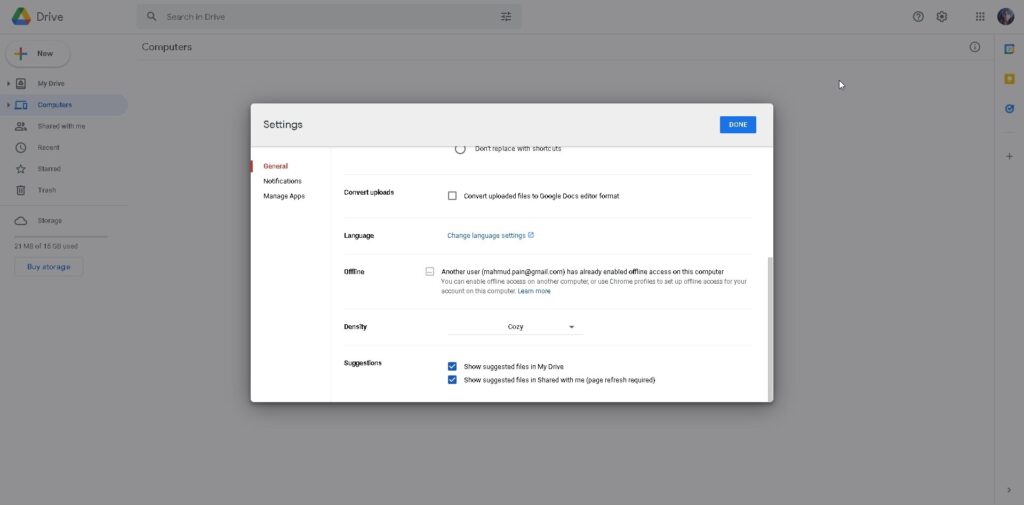
Once inside the Settings menu, stay on the General tab, which is selected by default. This tab contains the core preferences for your workspace behavior. Scroll down through the options until you find the section labeled Suggested files. Depending on your specific organization’s Workspace tier, this may still be referred to as “Quick Access” in some legacy menus, but the functionality remains the same.
Step 2: Disabling the Suggested Files Feature
Within the “Suggested files” (or “Suggestions”) section, you will typically find two or three checkboxes. To fully turn off Quick Access, you need to uncheck the box labeled Show suggested files in My Drive. This action immediately instructs the interface to hide the horizontal bar of file previews that usually appears at the top of your “My Drive” view. By removing this bar, your folders and files will shift upward, providing more vertical space for your actual directory structure.
In addition to hiding the bar in “My Drive,” you may also see an option to Show suggested files in Shared Drives. If you work extensively in collaborative environments, unchecking this as well will ensure a consistent, clean look across all your different drive locations. Once you have unchecked these boxes, Google Drive saves your preferences automatically, though it is a professional best practice to refresh the page to see the changes take effect immediately.
Step 3: Changing the Default Start Page
Even after disabling the suggested bar, Google Drive may still default to the “Home” view rather than your “My Drive” view when you first log in. The “Home” view is designed to be entirely suggestion-based. To bypass this and return to a traditional file management experience, look for the Start page setting within the same General settings menu we accessed in the previous step.
Change the “Start page” setting from “Home” to My Drive. This simple adjustment ensures that every time you open Google Drive, you are presented with your organized folder hierarchy instead of a list of files the AI thinks you might want. This direct path to your files eliminates an extra click and helps maintain a “folders-first” mental model, which is often more effective for long-term project management and data retrieval.
Managing Suggestions on Google Drive for Mobile
The mobile application for Google Drive (on both iOS and Android) also utilizes a suggestion-heavy interface, often found in the “Home” tab at the bottom of the app. While you cannot “disable” the Home tab entirely on mobile, you can change how you interact with the app. To avoid the suggested clutter, professionals should get into the habit of tapping the Files icon in the bottom right corner of the app immediately upon opening it.
The “Files” view on mobile mirrors your “My Drive” structure and ignores the algorithmic suggestions. Within the app’s internal settings (found under the three-line hamburger menu > Settings), you can also look for “Quick Access” or “Suggested” toggles. However, Google frequently updates the mobile UI, so the most reliable way to maintain a clean mobile experience is to utilize the “Files” tab as your primary navigation point, bypassing the “Home” suggestions entirely.
Why Disable Quick Access? Privacy and Focus
Beyond simple aesthetics, there are practical reasons to disable Quick Access. For users who frequently share their screens during meetings or presentations, Quick Access can pose a minor privacy risk. The feature might display sensitive documents, recent personal projects, or confidential client files at the very top of the screen the moment you open your browser. Disabling this ensures that your active workspace remains private until you intentionally navigate to a specific file.
From a productivity standpoint, the “Paradox of Choice” suggests that being presented with too many options—especially those generated by an algorithm—can actually slow down decision-making. By sticking to a strict folder structure, you rely on “spatial memory” to find files. You know a document is in “Project Alpha > Q1 Reports,” which creates a more predictable and less stressful workflow than scanning a rotating bar of suggested thumbnails every time you log in.
Alternative: Using Search Chips for Better Navigation
If you disable Quick Access but find that you miss the speed of finding recent files, Google Drive offers a more precise tool: Search Chips. Instead of letting the AI guess what you need, you can use the filters located just below the search bar to find files by “Type” (PDFs, Spreadsheets), “People” (Shared by a specific colleague), or “Last Modified.” These chips give you the same speed as Quick Access but with the added benefit of being user-driven and accurate.
Combining a clean “My Drive” view with the strategic use of search chips represents the “pro” way to manage Google Drive. You maintain a tidy, professional interface while retaining the ability to pull up any document in seconds. This hybrid approach respects your organizational system while leveraging the powerful indexing capabilities of the Google platform without the intrusive nature of the default suggested bar.
Does turning off Quick Access delete any of my files?
No. Turning off Quick Access or Suggested files only changes the visibility of those files on your dashboard. Your actual documents and folders remain exactly where they were saved in “My Drive” or “Shared Drives.” It is a purely aesthetic and navigational change.
Can I turn Quick Access back on later?
Absolutely. If you find that the AI suggestions were actually helpful for your workflow, you can return to the Settings menu and re-check the “Show suggested files” boxes at any time. The change is instantaneous and can be toggled as your project needs evolve.
Why do I still see “Suggested” files in the search bar?
Google Drive’s search bar uses an independent predictive engine to help you find files as you type. Disabling Quick Access on the main dashboard does not disable the search bar’s autocomplete suggestions. These are separate features designed to assist with active searching rather than passive browsing.
Conclusion
The modern Google Drive interface is designed to be helpful, but “help” is subjective in a professional environment. By turning off Quick Access and reconfiguring your default start page to “My Drive,” you transform Google Drive from a social-media-style feed of recent activity back into a powerful, organized filing system. This adjustment prioritizes your own organizational logic over the guesses of a machine learning algorithm, providing a cleaner workspace, improved privacy during screen shares, and a more focused mental environment. Whether you are managing a single personal project or an enterprise-level shared drive, maintaining control over your digital surroundings is essential for long-term productivity. Take a moment to adjust your settings today and experience a more streamlined, intentional way to interact with your cloud data.
