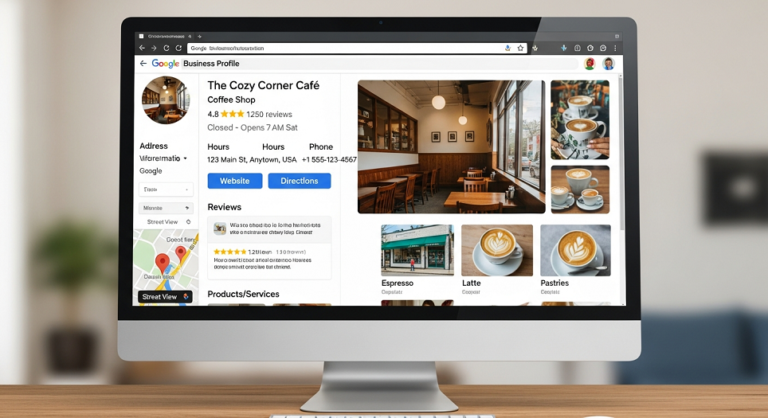
Why Google Business Profile Optimization Is More Critical Than Ever in 2025
In 2025, your Google Business Profile (GBP) is not just a digital business card—it’s the cornerstone of your local SEO strategy. With Google’s latest algorithm updates prioritizing user engagement, AI-driven search results, and real-time customer interactions, a well-optimized GBP can mean the difference between being invisible and dominating local search. Whether you’re a small café, a service-based business, or a multi-location brand, this ultimate guide will walk you through every step to optimize your profile, leverage the newest features, and outrank competitors in local search results.
From AI-powered menu parsing for restaurants to WhatsApp integration and the new “What’s Happening” feature, Google has rolled out game-changing tools in 2025. But simply having a profile isn’t enough. You need to strategically optimize it with the right keywords, high-quality visuals, and proactive engagement. This guide covers everything you need to know to turn your GBP into a customer magnet and local SEO powerhouse.
What’s New in Google Business Profile for 2025: Key Updates and Features
Google has introduced several major updates to Business Profiles in 2025, designed to enhance visibility, engagement, and conversion. Here’s what you need to know:
1. AI-Powered Menu Parsing for Restaurants
Restaurants and cafés can now upload a PDF or photo of their menu, and Google’s AI will automatically extract and format the information into a clean, searchable digital menu. This not only saves time but also ensures your offerings are always up-to-date and optimized for local search. The AI can even highlight popular dishes and specials, making it easier for customers to find what they’re looking for.
2. WhatsApp Integration for Real-Time Messaging
Google has integrated WhatsApp directly into Business Profiles, allowing customers to message you with one tap. This feature is especially valuable for businesses in retail, food service, and customer support, as it enables instant communication and can significantly boost conversions. To enable this, link your WhatsApp number in your GBP dashboard under the “Messaging” section.
3. “What’s Happening” Highlights for Time-Sensitive Updates
Businesses can now feature time-sensitive updates like daily specials, events, or promotions in a dedicated “What’s Happening” section. This feature is currently available for restaurants, bars, and event-based businesses, and it appears prominently in search results. Use it to showcase limited-time offers, happy hours, or live events to attract immediate attention.
4. Enhanced Review Engagement with Emoji Reactions
Google now allows businesses to react to reviews with emojis (such as hearts, thumbs-up, or fire), making it easier to engage with customers and show appreciation. While you can’t edit or delete reviews, responding with emojis and personalized replies can improve your profile’s credibility and encourage more feedback.
5. New Attributes for Women-Led and Eco-Friendly Businesses
Google has added new attributes to help businesses stand out, including “women-led” and “eco-friendly.” These tags can improve your visibility in niche searches and appeal to socially conscious consumers. To add these attributes, go to your GBP dashboard, select “Edit Profile,” and update your business details.
6. Local Service Ads Integration
Google is expanding its Local Service Ads (LSA) integration, allowing service-based businesses (like plumbers, electricians, and cleaners) to appear in both LSA and organic search results. This dual visibility can significantly increase your reach and lead generation. To qualify, ensure your profile is fully verified and optimized with accurate service descriptions and keywords.
7. Simplified Profile Management in Google Search and Maps
You can now manage your Business Profile directly from Google Search and Maps. Simply search for your business name while logged into the associated Google account, and you’ll see an “Edit Profile” option. This makes it easier to update information, respond to reviews, and post updates on the go.
Step-by-Step Guide to Optimizing Your Google Business Profile for Local SEO in 2025
Optimizing your Google Business Profile is a multi-step process that involves claiming your listing, providing accurate information, and actively engaging with customers. Follow these steps to ensure your profile is fully optimized for local SEO:
Step 1: Claim and Verify Your Business Profile
If you haven’t already, claim your Business Profile by visiting Google Business Profile and following the verification steps. Google offers several verification methods, including postcard, phone, email, or video. Video verification is the fastest option and is now available for most businesses.
- Go to Google Business Profile and sign in with your Google account.
- Enter your business name and address. If your business doesn’t have a physical location, select “I deliver goods and services to my customers.”
- Choose a verification method. For video verification, record a short video showing your business location, signage, and equipment.
- Submit the video and wait for Google’s approval (usually within 24 hours).
Step 2: Complete Every Section of Your Profile
A fully completed profile ranks higher in local search. Ensure every section is filled out accurately and thoroughly:
- Business Name: Use your exact, real-world business name. Avoid adding keywords or locations unless they’re part of your official name.
- Address: Enter your complete and accurate address. If you serve customers at their locations, specify your service areas.
- Phone Number: Use a local phone number to build trust and improve local rankings.
- Website: Link to your official website. Ensure the URL is correct and leads to a mobile-friendly page.
- Hours of Operation: Update your hours regularly, including special hours for holidays or events.
- Business Category: Choose the most specific primary category that describes your core business. Add relevant secondary categories to cover all your services.
- Attributes: Select all applicable attributes, such as “women-led,” “eco-friendly,” “free Wi-Fi,” or “wheelchair accessible.”
- Business Description: Write a concise, keyword-rich description (up to 750 characters) that highlights what makes your business unique. Include your primary keywords naturally.
Step 3: Optimize for Local Keywords
Keywords play a crucial role in helping your profile rank for relevant searches. Here’s how to incorporate them strategically:
- Business Name and Description: Include your primary keyword (e.g., “best coffee shop in [City]”) in your business description, but avoid stuffing. Google’s algorithm prioritizes natural, user-friendly language.
- Services and Products: List all your services and products with detailed descriptions. Use long-tail keywords that potential customers might search for (e.g., “organic cold brew coffee delivery in [City]”).
- Posts and Updates: Regularly publish posts with local keywords. For example, a restaurant might post: “Try our new vegan burger—now available for lunch in [City]!”
- Reviews and Q&A: Encourage customers to use keywords in their reviews. Respond to questions in the Q&A section with detailed, keyword-rich answers.
Pro Tip: Use tools like Google Keyword Planner, SEMrush, or Ahrefs to identify high-volume, low-competition local keywords. Focus on terms that include your city, neighborhood, or region.
Step 4: Add High-Quality Photos and Videos
Visuals are one of the most influential factors in attracting customers. Businesses with photos receive 42% more requests for directions and 35% more clicks to their websites. Follow these best practices:
- Profile Photo: Use a high-resolution logo or a professional photo of your storefront.
- Cover Photo: Choose an image that represents your business, such as your team, best-selling product, or interior.
- Additional Photos: Upload at least 10 high-quality images, including:
- Interior and exterior shots of your business
- Photos of your products or services in action
- Team photos to humanize your brand
- Before-and-after shots (for service-based businesses)
- Videos: Add short videos (up to 30 seconds) showcasing your business, such as a virtual tour, customer testimonials, or a day in the life of your team.
- Geotagging: Geotag your images before uploading to improve local relevance.
Step 5: Leverage Google Posts for Engagement
Google Posts allow you to share updates, offers, events, and news directly on your profile. These posts appear in search results and can drive significant engagement. Here’s how to use them effectively:
- Types of Posts:
- Updates: Share news, such as new products, team members, or business milestones.
- Offers: Promote discounts, seasonal sales, or loyalty programs.
- Events: Highlight upcoming events, workshops, or webinars.
- Products: Showcase featured products with prices, descriptions, and photos.
- Best Practices:
- Post at least once a week to stay visible.
- Use high-quality images and include a clear call-to-action (e.g., “Book Now,” “Learn More,” or “Call Today”).
- Keep posts concise (100–300 characters) and include relevant keywords.
- Use the “What’s Happening” feature for time-sensitive updates.
Step 6: Manage and Respond to Reviews
Reviews are a critical ranking factor and can make or break your reputation. Google’s algorithm favors businesses with a high volume of positive reviews and active responses. Here’s how to manage them:
- Encourage Reviews: Politely ask satisfied customers to leave a review. Include a direct link to your review page in emails, receipts, or on your website.
- Respond to All Reviews: Thank customers for positive reviews and address negative feedback professionally. Use emoji reactions to show appreciation quickly.
- Handle Negative Reviews: Apologize for any issues, offer a solution, and take the conversation offline if needed. Avoid being defensive or argumentative.
- Monitor Review Trends: Use the insights in your GBP dashboard to track review sentiment and identify areas for improvement.
Step 7: Use the Q&A Section Proactively
The Q&A section is often overlooked but can be a powerful tool for local SEO. Potential customers ask questions here, and your answers can appear in search results. Here’s how to optimize it:
- Seed the Q&A: Ask and answer common questions yourself to provide helpful information upfront.
- Use Keywords: Incorporate relevant keywords in your answers to improve visibility.
- Monitor Regularly: Set up alerts to respond quickly to new questions. Unanswered questions can hurt your credibility.
Step 8: Track Performance with Google Insights
Google provides valuable data on how customers find and interact with your profile. Use these insights to refine your strategy:
- Search Queries: See which keywords customers use to find your business. Use this data to optimize your profile further.
- Customer Actions: Track how many users visit your website, request directions, or call you directly from your profile.
- Photo Views: Monitor which photos get the most views and update your visuals accordingly.
- Review Analytics: Analyze review trends to identify strengths and weaknesses in your customer experience.
Pro Tips for Dominating Local SEO with Your Google Business Profile
To truly stand out in 2025, go beyond the basics with these advanced strategies:
1. Optimize for Voice and AI Search
With the rise of voice search and AI-driven results, optimize your profile for conversational queries. For example, instead of targeting “best pizza NYC,” include phrases like “Where can I find the best gluten-free pizza near me?” in your posts and descriptions.
2. Use Local Schema Markup on Your Website
Add local business schema markup to your website to help Google understand your business details (such as address, phone number, and hours). This can improve your chances of appearing in rich snippets and the local pack.
3. Leverage User-Generated Content
Encourage customers to upload their own photos and videos to your profile. User-generated content (UGC) builds trust and can improve your ranking. Feature the best UGC in your posts or as profile highlights.
4. Create a Google Posts Content Calendar
Plan your Google Posts in advance to ensure consistent engagement. Mix promotional content with educational posts (e.g., tips, behind-the-scenes looks, or customer stories) to keep your audience interested.
5. Integrate with Google’s E-Commerce Features
If you sell products, use Google’s e-commerce integration to showcase your inventory directly on your profile. This feature is especially useful for retail businesses and can drive sales without customers leaving the search results page.
6. Monitor Competitors’ Profiles
Regularly check your competitors’ GBPs to see what’s working for them. Look for gaps in their profiles (such as missing photos or unanswered questions) and capitalize on those opportunities in your own profile.
7. Use Google’s “Follow” Feature
Encourage customers to “follow” your Business Profile to receive updates directly in their Google Search and Maps. Promote this feature in your emails, on your website, and in-store to build a loyal audience.
8. Optimize for Mobile Users
Over 60% of local searches happen on mobile devices. Ensure your profile is mobile-friendly by using high-quality, fast-loading images and concise, scannable descriptions.
Frequently Asked Questions (FAQs) About Google Business Profile Optimization
1. How often should I update my Google Business Profile?
Update your profile whenever there’s a change in your business information (such as hours, address, or services). Additionally, post updates at least once a week to keep your profile active and engaging.
2. Can I add multiple locations to one Google Business Profile?
No, each physical location requires its own Business Profile. However, you can manage multiple locations from a single Google account using the bulk management tool.
3. How do I choose the best primary category for my business?
Select the category that most accurately describes your core business. For example, a coffee shop that also sells books should choose “Coffee Shop” as the primary category and “Bookstore” as a secondary category. Avoid overly broad categories.
4. What’s the best way to respond to negative reviews?
Stay professional and empathetic. Apologize for the issue, offer a solution (such as a refund or follow-up call), and invite the customer to discuss the matter privately. Avoid arguing or making excuses.
5. How can I improve my local ranking on Google?
Focus on completing every section of your profile, using local keywords, posting regularly, and encouraging customer reviews. Engaging with your audience (such as responding to Q&A and reviews) also signals to Google that your business is active and trustworthy.
6. Should I use the same keywords in my business description and posts?
Yes, but vary your language to sound natural. For example, if your primary keyword is “best hair salon in [City],” you might use “top-rated hair salon near [Neighborhood]” in a post. Avoid keyword stuffing, as it can hurt your ranking.
7. Can I edit my business name to include keywords?
No. Google’s guidelines prohibit adding unnecessary keywords to your business name. Use your official, real-world business name to avoid penalties.
8. How do I track the performance of my Google Business Profile?
Use the “Insights” tab in your GBP dashboard to monitor views, searches, and customer actions. Pay attention to trends in photo views, review sentiment, and the keywords customers use to find you.
9. What’s the best type of photo to upload to my profile?
Use high-resolution, well-lit photos that showcase your business authentically. Include exterior shots (for recognition), interior shots (for ambiance), and photos of your products/services in action. Avoid stock photos.
10. How can I get more reviews on my Google Business Profile?
Ask satisfied customers directly, either in person, via email, or through follow-up messages. Make it easy by providing a direct link to your review page. You can also incentivize reviews with small discounts or entry into a giveaway (but avoid paying for reviews, as it violates Google’s policies).
11. Is it worth using Google’s new “What’s Happening” feature?
Absolutely. The “What’s Happening” section is designed to highlight time-sensitive updates, making it perfect for promoting events, flash sales, or daily specials. Use it to create urgency and attract immediate attention.
12. Can I use emojis in my Google Business Profile posts?
Yes, emojis can make your posts more engaging and visually appealing. However, use them sparingly and ensure they’re relevant to your message. Avoid overusing emojis, as it can appear unprofessional.
Common Mistakes to Avoid When Optimizing Your Google Business Profile
Even with the best intentions, businesses often make mistakes that hurt their local SEO. Here’s what to avoid:
- Incomplete or Inaccurate Information: Missing or incorrect details (such as address, hours, or phone number) can confuse customers and lower your ranking.
- Ignoring Reviews: Failing to respond to reviews—especially negative ones—can damage your reputation and visibility.
- Using Low-Quality Photos: Blurry, poorly lit, or irrelevant images can deter potential customers. Invest in high-quality visuals.
- Keyword Stuffing: Overloading your profile with keywords can trigger spam filters and hurt your ranking. Keep your language natural and user-friendly.
- Neglecting Google Posts: Infrequent or outdated posts signal inactivity to Google’s algorithm. Aim for at least one post per week.
- Not Monitoring Insights: Ignoring performance data means missing opportunities to improve. Regularly check your Insights tab to refine your strategy.
- Using a Virtual Office Address: Google requires a physical address for most businesses. Virtual offices or P.O. boxes can lead to suspension.
- Duplicate Listings: Having multiple profiles for the same location can confuse customers and harm your ranking. Consolidate duplicates into a single, verified listing.
How to Use Google Business Profile for Different Types of Businesses
While the core optimization steps apply to all businesses, certain industries can leverage specific features for maximum impact. Here’s how:
1. Restaurants and Cafés
- Use the AI-powered menu parsing feature to keep your menu up-to-date and searchable.
- Post daily specials and happy hour deals in the “What’s Happening” section.
- Encourage customers to upload photos of their meals to build social proof.
- Respond to reviews with emojis and personalized messages to show appreciation.
2. Retail Stores
- Showcase your products with high-quality photos and videos, including 360-degree views.
- Use Google’s e-commerce integration to display in-stock items directly on your profile.
- Post about sales, new arrivals, and seasonal promotions to drive foot traffic.
- Enable the WhatsApp messaging feature for instant customer inquiries.
3. Service-Based Businesses (Plumbers, Electricians, Cleaners)
- Highlight your service areas and availability in your business description.
- Use before-and-after photos to showcase your work (e.g., clean carpets, fixed pipes).
- Leverage Local Service Ads integration to appear in both organic and paid search results.
- Encourage customers to leave reviews mentioning specific services (e.g., “emergency plumbing repair”).
4. Hotels and Hospitality
- Upload virtual tours of your rooms and amenities to attract bookings.
- Use the “What’s Happening” feature to promote events, spa specials, or dining offers.
- Respond to every review, especially those mentioning cleanliness, service, or location.
- Add attributes like “free breakfast,” “pet-friendly,” or “eco-certified” to stand out.
5. Professional Services (Lawyers, Accountants, Consultants)
- Use your business description to highlight your expertise and unique selling points.
- Post educational content, such as tips, case studies, or FAQs, to establish authority.
- Encourage clients to leave detailed reviews mentioning specific services (e.g., “divorce lawyer in [City]”).
- Add a virtual consultation link to your profile for easy booking.
The Future of Google Business Profile: What to Expect in 2026 and Beyond
Google is continuously evolving its Business Profile platform to reflect changing user behaviors and technological advancements. Here’s what’s on the horizon:
- More AI Integration: Expect AI to play a larger role in automating profile updates, generating content, and personalizing search results based on user preferences.
- Expanded E-Commerce Features: Google may introduce more robust shopping tools, allowing businesses to sell products directly from their profiles.
- Enhanced Video Content: Video posts and live streams could become more prominent, giving businesses new ways to engage with customers in real time.
- Sustainability Attributes: Google is likely to add more attributes related to sustainability, such as “carbon-neutral” or “zero-waste,” to help eco-conscious consumers find aligned businesses.
- Voice Search Optimization: As voice search grows, profiles optimized for conversational queries will have a competitive edge.
- Augmented Reality (AR) Features: Businesses may soon be able to offer AR experiences, such as virtual try-ons for retail products or interactive tours for real estate.
Staying ahead of these trends will require businesses to be adaptable and proactive in updating their profiles. Regularly check Google’s official announcements and experiment with new features as they roll out.
Conclusion: Your Google Business Profile Is Your Local SEO Secret Weapon
Your Google Business Profile is more than just a listing—it’s a dynamic tool that can drive traffic, build trust, and boost conversions. By following the steps in this guide, you’ll not only optimize your profile for 2025’s local SEO landscape but also position your business for long-term success. From leveraging AI-powered features to engaging with customers through reviews and posts, every detail matters in standing out from the competition.
Remember, local SEO is an ongoing process. Regularly update your profile, monitor your performance, and adapt to new features and trends. With a well-optimized Google Business Profile, you’ll turn local searches into loyal customers and dominate your market in 2025 and beyond.