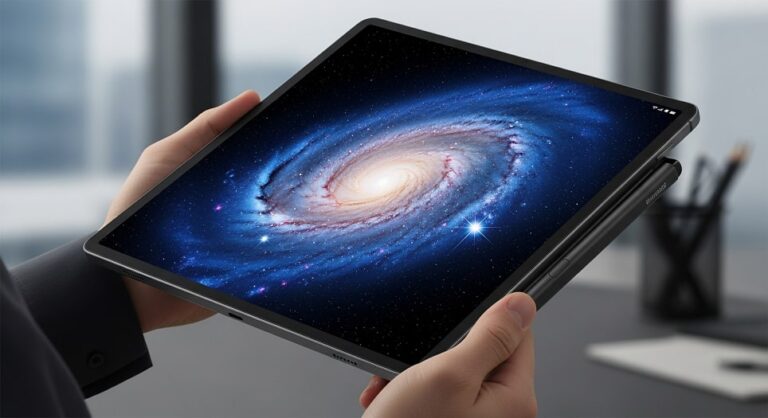
The rise of the ultra-large tablet segment has presented a new frontier for mobile computing, blurring the lines between traditional slates and full-fledged laptop replacements. When Samsung introduced its largest-ever tablet, the Galaxy Tab S8 Ultra, it didn’t just introduce a device; it challenged the conventional understanding of tablet usability and screen real estate. Launched as the pinnacle of the Galaxy Tab S8 series, this device was a daring statement on how expansive a portable productivity machine could truly be.
This comprehensive review delves into the lasting legacy and current performance of the S8 Ultra. While newer generations exist, the unique combination of its massive screen, premium build quality, powerful processor, and refined software experience makes it a highly compelling option, especially for professionals, artists, and power users who value screen size above all else. We dissect the core components that define the user experience, from the industry-leading display technology to the desktop-class multitasking capabilities offered by Samsung DeX.
We will examine whether the hardware—specifically the 4nm Snapdragon platform—and the enduring software support hold up in today’s demanding digital landscape, focusing on raw performance metrics, the nuanced S Pen integration, and the practical application of its desktop environment features. This detailed analysis serves as a definitive guide for anyone considering this tablet for intense workloads, creative endeavors, or high-fidelity media consumption.
The Grand Canvas: Design and Display Excellence
The most immediate and defining characteristic of the Samsung Galaxy Tab S8 Ultra is its sheer size. Measuring 14.6 inches diagonally, the display dominates the device, offering a visual workspace that rivals many ultrabook laptops. Despite its immense screen area, Samsung achieved a remarkably thin profile, clocking in at an almost unbelievable 5.5mm. This design choice, coupled with the Armor Aluminum casing, manages to make the tablet feel robust yet surprisingly lightweight for its dimensions, easing concerns about portability.
However, the size is a deliberate trade-off. While it is too large for comfortable one-handed operation or lap use without the proper accessories, this device is engineered to deliver a maximum desktop or cinema-like experience. The sleek, graphite finish and the magnetic strip for the S Pen on the rear maintain the signature premium aesthetic associated with Samsung’s flagship line.
14.6-inch Super AMOLED Panel: A Visual Benchmark
The core of the S8 Ultra’s appeal lies in its display technology. Samsung equipped the device with a 14.6-inch Super AMOLED panel boasting a resolution of 2960 x 1848 pixels (WQXGA+). This AMOLED technology provides pixel-perfect black levels and an infinite contrast ratio, resulting in stunningly vibrant colors and exceptional depth, which is paramount for both media consumption and professional color-sensitive work like photo editing or digital illustration.
Crucially, the screen supports a 120Hz refresh rate. This high refresh rate ensures that scrolling, animations, and S Pen input are buttery smooth and highly responsive, dramatically enhancing the user experience across all applications, from gaming to simple web browsing. The responsiveness combined with the ultra-low latency S Pen is what elevates the S8 Ultra beyond a typical media slate and into the realm of professional digital workspace.
The panel, protected by Corning Gorilla Glass 5, maintains excellent clarity and brightness, performing admirably even in bright conditions. While the reflective nature of glass screens remains a factor, the high peak brightness helps mitigate glare. The narrow bezels around the display maximize screen-to-body ratio (around 90%), contributing to the immersive quality, though they necessitated the inclusion of a subtle notch to house the advanced dual front-facing cameras.
Raw Power and Enduring Performance Metrics
Under the ultra-thin hood, the Galaxy Tab S8 Ultra is powered by the Qualcomm Snapdragon 8 Gen 1 processor, a 4nm octa-core chip that represented the cutting edge of mobile processing at its release. Paired with substantial RAM options, ranging from 8GB up to a massive 16GB, and storage configurations up to 512GB (expandable via microSDXC), the S8 Ultra offers desktop-class specifications intended for intensive workloads.
The performance capabilities are not limited to simple tasks. The Snapdragon 8 Gen 1, despite being succeeded by newer chipsets, still provides exceptional speed and efficiency for everyday operations, heavy multitasking, and high-demand applications. Whether running graphic-intensive games, rendering high-resolution video projects, or manipulating large multi-layered files in creative software, the tablet maintains consistently high frame rates and quick processing times. The expansive surface area of the metal backplate also aids in thermal dissipation, allowing the processor to sustain high performance under load with minimal noticeable throttling compared to smaller, similarly-powered devices.
Memory and Storage Configurations
The variety of memory and storage options caters to diverse user needs, solidifying its appeal as a professional tool. While the base 8GB RAM configuration is suitable for general use and media consumption, the higher tiers—12GB and 16GB—are essential for heavy productivity and demanding creative workflows.
The inclusion of a microSDXC slot, supporting up to 1TB of external storage, is a significant advantage over many competitors. This flexibility allows users to manage project files, media libraries, and app installations without relying solely on the internal UFS storage, providing cost-effective expansion. The operating system, originally Android 12 with One UI 4.1, benefits from Samsung’s commitment to providing up to four years of major OS upgrades and five years of security patches, ensuring the platform remains current, secure, and feature-rich well into the future.
Productivity Paradigm Shift: S Pen and DeX
What truly sets the Galaxy Tab S8 Ultra apart is its ecosystem integration focused squarely on productivity, headlined by the included S Pen and the robust Samsung DeX software feature. These tools transform the large tablet into a versatile powerhouse capable of shifting seamlessly between a touch-first interface and a desktop environment.
The S Pen stylus itself has been continuously refined, offering an ultra-low latency of just 2.8ms. This near-instantaneous response time creates a highly natural and satisfying writing and drawing experience, closely mimicking the feeling of a real pen on paper. This precision is invaluable for detailed artwork, note-taking in lectures or meetings, and annotating documents. The S Pen comes included in the box, a crucial value addition that is often an expensive optional accessory for competing devices.
Mastering the Desktop Environment with Samsung DeX
Samsung DeX is the dedicated software feature that enables the tablet to transition into a desktop-like operating system. Accessible through a quick tap in the settings, DeX presents a familiar Windows-esque interface complete with a taskbar, app windows that can be resized and moved, and a desktop for shortcuts.
This mode drastically enhances multitasking capabilities. Unlike the standard Android multi-window feature, DeX allows multiple applications to run simultaneously in independent, overlapping windows, just like on a PC. This is vital for complex workflows, such as having a code editor open alongside a browser for reference, or running a video conference while simultaneously editing a document. DeX can be used directly on the tablet screen or mirrored/extended wirelessly or via HDMI to an external display, providing true dual-screen functionality for professional setups. The integration with the optional Book Cover Keyboard, which features a trackpad and backlit keys, further solidifies its utility as a 2-in-1 computing device.
- Multi-Active Windows Capability: DeX allows users to operate numerous applications in fully resizable and movable windows, breaking the constraints of typical mobile OS screen splitting. This permits complex professional workflows, such as cross-referencing research materials while drafting a report or running a virtual meeting alongside a shared document editor. The ability to manage up to five application windows simultaneously elevates the tablet to near-desktop efficiency levels.
- Wireless DeX and Second Screen Functionality: The tablet can connect wirelessly to compatible smart TVs or monitors to project the full DeX desktop experience, effectively turning a large screen into a workspace powered by the tablet. Furthermore, the ‘Second Screen’ feature allows the Tab S8 Ultra to act as a secondary display for a Windows PC, providing valuable extra screen real estate for laptops and desktops, using either a wireless connection or a USB cable.
- Ultra-Low Latency S Pen Integration: The S Pen’s 2.8ms latency, significantly faster than previous models, ensures drawing and note-taking feel immediate and natural. This makes professional graphic design, detailed CAD drawing annotations, and high-speed handwritten note capture reliable and enjoyable, bridging the gap between digital and physical input methods.
- One UI and Android Ecosystem Integration: Running on Samsung’s customized One UI overlay, the tablet leverages Android’s vast application library while adding Samsung’s unique productivity tools like Samsung Notes, which features seamless synchronization across Galaxy devices and robust organizational tools including automatic text conversion. The ‘App Continuity’ feature further allows tasks started on a Samsung phone to be instantly continued on the tablet.
- Auto-Framing Dual Front Cameras: The dual 12MP front camera setup (Wide and Ultra-Wide) is specifically optimized for high-quality video conferencing, supporting 4K recording. The ‘Auto-Framing’ technology intelligently tracks the subject and zooms or pans to keep them centered, which is essential for professional remote meetings or educational sessions where movement is common.
- Robust Security with Knox Suite: For enterprise and business users, the integration of Samsung Knox provides a defense-grade security platform, offering hardware-backed protection for sensitive data. Features like Samsung Knox Vault ensure secure credential management, making the tablet a reliable choice for corporate deployment and handling confidential information.
- WLAN and 5G Connectivity: Offering support for Wi-Fi 6E, the tablet provides fast and stable network connections in supported environments. Optional 5G models ensure high-speed cellular data connectivity, making the device a true mobile workstation capable of uploading large files and conducting high-bandwidth tasks remotely without relying on public Wi-Fi.
- Quad Stereo Speakers with Dolby Atmos: The audio experience, driven by four stereo speakers tuned by AKG with Dolby Atmos support, delivers rich, volumetric sound. This quality is crucial for professional audio monitoring, media production review, and simply enjoying high-fidelity streaming content on the massive display.
Camera Capabilities and Communication Tools
While cameras on a tablet are often secondary to a smartphone’s setup, the Galaxy Tab S8 Ultra features surprisingly capable optics tailored specifically for communication and document capture, recognizing the tablet’s role in remote work.
Dual Front Camera System for Video Conferencing
The tablet features a unique dual front camera array—a 12MP wide lens and a 12MP ultrawide lens—set into the display notch. This setup is specifically optimized for superior video conferencing, offering high-resolution 4K video recording at 30/60fps. The ultrawide lens is instrumental when incorporating multiple people into a frame, utilizing Samsung’s Auto Framing technology. Auto Framing intelligently pans and zooms the camera feed to keep participants centered and in focus during virtual meetings on platforms like Google Duo or Zoom, enhancing the professional video call experience.
The rear camera system is composed of a 13MP wide-angle camera and a 6MP ultrawide lens. While not comparable to flagship smartphone cameras, this configuration is perfectly adequate for scanning documents, capturing notes from a whiteboard, or taking quick reference photos, which are common tasks in a professional or educational setting. Three built-in directional microphones further ensure clear voice capture, utilizing noise cancellation to isolate the user’s voice from background noise.
Power Management and Battery Endurance
To fuel its massive display and powerful internal components, the Galaxy Tab S8 Ultra is equipped with an 11,200mAh (typical) battery, one of the largest capacities available in the tablet market. This significant battery size is designed to provide all-day endurance for general usage tasks.
However, the actual battery life is highly dependent on usage patterns, particularly the display settings. Heavy tasks or continuous use of the 120Hz refresh rate will deplete the battery more quickly than standard 60Hz mode. Verifiable tests indicate that under moderate 60Hz usage with Wi-Fi, users can expect around 8 hours of screen-on time, dropping to about 5 hours under continuous heavy load or 120Hz operation. This performance is competitive given the tablet’s immense screen size.
Charging Speed and Adapter Requirement
The tablet supports 45W Super Fast Charging 2.0, allowing the enormous battery to recharge relatively quickly. Utilizing a compatible 45W charger—which, standard for modern Samsung flagships, is sold separately—the device can go from empty to 100% capacity in approximately 82 minutes. This rapid charging capability is crucial for minimizing downtime, especially for users relying on the S8 Ultra as their primary work device.
The omission of the charger from the box is an important detail for potential buyers, requiring a separate purchase of the appropriate high-wattage charger to take full advantage of the device’s charging speed.
Current Market Price and Deals
As the Samsung Galaxy Tab S8 Ultra was released in early 2022, its official retail price has stabilized, and the device is now frequently found through third-party retailers and, most commonly, in the refurbished market. This transition makes the S8 Ultra a considerably more appealing value proposition for consumers who can accept an older generation model.
New, sealed models are increasingly rare, commanding high prices, but the most aggressive pricing is observed in the refurbished and excellent condition used markets. Pricing varies significantly based on configuration (Wi-Fi only vs. 5G) and storage/RAM combinations (8GB/128GB being the lowest tier, 16GB/512GB being the highest).
Based on recent market trends:
- Base Wi-Fi Model (8GB RAM, 128GB Storage): Used/Refurbished models often start in the range of €978 to €1029.95, or roughly $1050 to $1100 USD, depending on the region, condition (e.g., ‘Very Good’ or ‘Excellent’), and vendor guarantee. These deals typically offer the S Pen and a compatible charging cable, but not the power brick.
- Mid-Tier 5G Model (12GB RAM, 256GB Storage): Prices for configurations with cellular connectivity generally range between €1079.95 and €1174.95 ($1160 to $1260 USD) when found in reliable refurbished condition. This tier is popular among business users needing constant connectivity.
- Premium Wi-Fi Model (16GB RAM, 512GB Storage): The highest configuration, often sought by content creators, can cost around €1299.95 to €1404.95 ($1400 to $1500 USD) refurbished. Deals often include bundled accessories or extended warranty options from the seller to compete with the newer generation S9 Ultra.
Buyers should always confirm that the S Pen is included, as it significantly impacts the tablet’s value. Deals and discounts are most often found through major electronic retailers’ clearance sales, specialized refurbished marketplaces, or carrier promotions for the 5G version.
Pros and Cons: A Balanced Assessment
Evaluating the Samsung Galaxy Tab S8 Ultra requires a balanced look at its impressive strengths and its inherent limitations.
Advantages
- Unparalleled 14.6-inch Super AMOLED Display: The screen is the tablet’s greatest asset, offering an immersive, high-resolution visual experience that is unmatched in the Android tablet space. The 120Hz refresh rate and perfect blacks are ideal for both creative work and high-fidelity video streaming.
- Desktop-Grade Multitasking via DeX: Samsung DeX transforms the device into a functional desktop environment, enabling true multi-window productivity and making it a viable laptop alternative for many professional workloads. This feature is a game-changer for mobile professionals and power users.
- Premium Build Quality and Sleek Design: Despite its massive size, the 5.5mm thickness and Armor Aluminum chassis make it incredibly thin and durable. It strikes a rare balance between a huge screen and high portability.
- S Pen Included with Ultra-Low Latency: The inclusion of the highly responsive S Pen out of the box adds immense value for artists and note-takers, distinguishing it from competitors who often charge extra for the primary input tool.
- Exceptional Communication Features: The dual 12MP front cameras with Auto Framing and the three-microphone array provide professional-grade video conferencing capabilities that exceed those of many laptops.
Disadvantages
- Limited App Optimization for Android Tablets: While Android has improved, many professional desktop-class applications still lack native optimization for a screen this large, limiting the full potential of the display compared to Windows or iOS alternatives.
- Accessory Dependence for Productivity: To truly harness its laptop-replacement potential, accessories like the Book Cover Keyboard are necessary, which adds significant weight, bulk, and cost to the overall setup.
- No Charger in the Box: Despite the tablet supporting 45W fast charging, the required high-wattage power adapter must be purchased separately, adding an unexpected cost for users who don’t already own one.
- Large and Unwieldy for Casual Use: The 14.6-inch size makes the tablet awkward for casual, handheld use like reading in bed or quick browsing, proving its identity is firmly rooted in professional, two-handed operation.
Pro Tips: Maximizing the Galaxy Tab S8 Ultra Experience
To truly unlock the potential of this powerful machine, users must move beyond standard Android operation and leverage its unique features and ecosystem integrations.
Leveraging Full Desktop Functionality
The biggest hurdle for new users is often treating the device solely as a large smartphone. The key to maximizing the S8 Ultra’s productivity is spending significant time in Samsung DeX mode, even when using the tablet standalone. Configuring DeX to auto-start when the Book Cover Keyboard is attached creates a seamless laptop transition. Use keyboard shortcuts (such as Alt+Tab for app switching) which are fully supported in DeX, to manage multiple application windows efficiently, treating the tablet like a full desktop.
Furthermore, use DeX’s ability to utilize Android’s multi-active windows alongside traditional desktop windowing. While some apps prefer a fullscreen presentation, most productivity suites (Microsoft Office, Google Workspace) thrive in resizable windows, allowing true side-by-side editing and research without constant switching between applications.
Optimizing the S Pen for Creative Workflow
For artists, the ultra-low latency S Pen is a game-changer. Ensure you download and utilize professional-grade drawing applications that take advantage of pressure sensitivity and tilt features, such as Clip Studio Paint (often included with a trial) or Concepts. In Samsung Notes, utilize the ability to sync handwritten notes instantaneously across your phone and tablet, and take advantage of the quick-conversion feature to turn your handwritten notes into typed text for easier sharing and archival.
To preserve the pristine display, consider purchasing a “paper-feel” screen protector. While this might slightly diminish the AMOLED vibrancy, it provides the necessary friction to replicate a drawing or writing experience closer to traditional materials, giving artists superior control and comfort over long working periods.
Smart Power and Ecosystem Management
Manage the 120Hz refresh rate wisely to preserve battery life. While it is excellent for dynamic content, switching back to 60Hz in the display settings when performing static tasks like reading or long-form writing can significantly extend the endurance. Also, invest in a 45W PD (Power Delivery) charger from a reputable brand to ensure you benefit from the fastest charging speeds. Using a standard 15W or 25W charger will dramatically increase the required charging time.
Finally, leverage the Galaxy Ecosystem. Use Quick Share for lightning-fast file transfers with other Samsung devices. Set up Buds Auto Switch for automatic audio connection switching between your tablet and phone. Most importantly, configure the tablet as a ‘Second Screen’ for a Windows PC when working at a stationary desk, effectively turning your tablet into a high-quality, 14.6-inch wireless monitor.
Frequently Asked Questions (FAQ)
Is the Galaxy Tab S8 Ultra still worth buying now that the S9 Ultra is available?
Yes, absolutely, especially if cost efficiency is a major factor. The Galaxy Tab S8 Ultra still offers 90% of the flagship experience. The core differences with the newer S9 Ultra (e.g., the Snapdragon 8 Gen 2/3, and IP68 rating) do not drastically change the daily productivity workflow for most users. The S8 Ultra’s large Super AMOLED screen, fast S Pen, and DeX functionality remain top-tier, and its current refurbished price point offers superior value for money compared to the premium price tag of the latest generation.
What is the benefit of the dual front cameras on the Tab S8 Ultra?
The dual front camera setup (wide and ultrawide) is designed specifically to enhance video calling. The ultrawide sensor enables the Auto Framing feature, which automatically keeps you centered in the frame, even if you move, and zooms out smoothly to include others who join the call. This provides a much more professional and dynamic video conferencing experience than a single, fixed camera setup.
How is the performance of the Snapdragon 8 Gen 1 processor today?
The Snapdragon 8 Gen 1 remains a very powerful and capable processor. It handles all current-generation mobile games at high settings and maintains excellent performance in professional productivity applications, including video editing and complex photo manipulation. While newer chips offer marginal efficiency gains, the 8 Gen 1 provides more than enough horsepower for any heavy multitasking or content creation tasks you may encounter on the Android platform.
Can the Tab S8 Ultra truly replace a laptop?
For a specific subset of users, the answer is yes. If your workflow primarily involves web browsing, document creation (Word, Google Docs), email management, light photo/video editing, and using Android-optimized productivity apps, the Tab S8 Ultra with the Book Cover Keyboard functions as an effective laptop replacement, largely thanks to the desktop interface provided by Samsung DeX. However, it cannot replace a laptop for specialized software that requires a full desktop operating system (Windows or macOS) or heavy-duty rendering tasks that demand dedicated high-end PC hardware.
Does the notch on the display interfere with viewing experience?
The notch is noticeable but tends to blend into the user experience over time, especially when consuming content in landscape orientation where the bezels are already thin. Most media (movies, YouTube) is formatted to a ratio that avoids the area occupied by the notch, and software intelligently handles the display area during app use. It’s a small aesthetic compromise made to achieve the tablet’s near-bezel-less design and house the advanced dual front cameras.
Conclusion
The Samsung Galaxy Tab S8 Ultra established itself as a technological pioneer, fundamentally reshaping expectations for the modern tablet. It is defined by its core assets: the breathtaking 14.6-inch Super AMOLED, 120Hz display which offers an unparalleled viewing experience; the highly responsive, included S Pen that caters directly to creative professionals and dedicated note-takers; and the transformative power of Samsung DeX, which grants the device the flexibility to operate as a functional desktop replacement.
While newer models have brought marginal processor and durability improvements, the S8 Ultra’s foundation—built on the still-powerful Snapdragon 8 Gen 1, an enduring commitment to software support, and a remarkably thin chassis—ensures it remains a highly relevant and competitive choice today. For users whose primary requirement is maximum screen real estate combined with a premium media and productivity environment, the S8 Ultra is not merely a large tablet; it is a dedicated, versatile workstation. Its current position in the market, often available at a significant discount through refurbished channels, cements its status as an exceptional value proposition for those looking to acquire a near-desktop-class Android tablet without the latest generation’s premium price tag. Ultimately, the S8 Ultra delivers a potent mix of enduring performance, luxurious display technology, and unrivaled productivity features, making it a definitive choice for the professional seeking a true mobile powerhouse.