

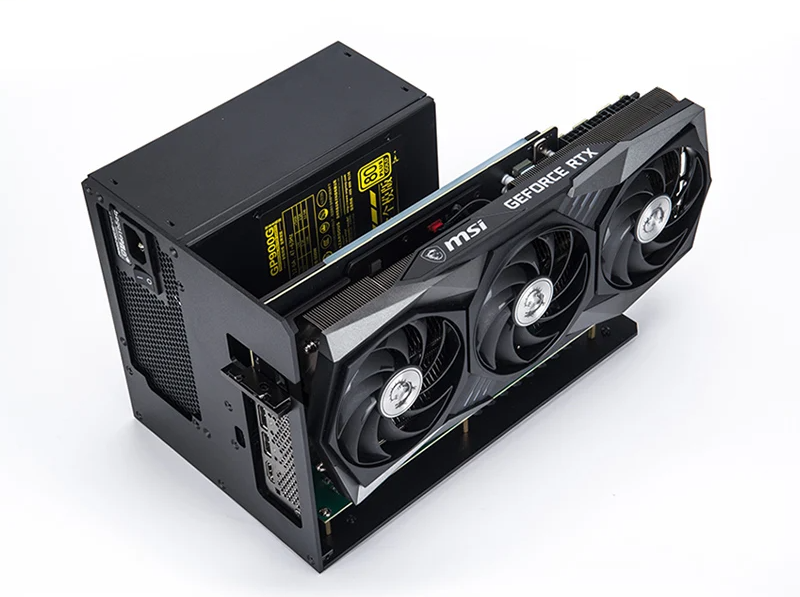
The concept of the external Graphics Processing Unit (eGPU) has always promised the best of both worlds: desktop-class graphics power for demanding tasks and gaming, combined with the sleek portability of a modern laptop. The introduction of the Thunderbolt 4 standard has refined this promise, offering guaranteed 40Gbps bandwidth, enhanced stability, and better universal compatibility. However, the latest generation of flagship graphics cards, particularly the NVIDIA GeForce RTX 4090 and the AMD Radeon RX 7900 XT, present a unique challenge. These colossal, power-hungry GPUs demand a massive amount of data bandwidth, which the Thunderbolt connection, despite its improvements, can struggle to fully deliver. This comprehensive guide details the state of Thunderbolt 4 eGPUs, analyzes their performance with high-end cards, and outlines the best enclosures currently available for enthusiasts and professionals.
Understanding the Thunderbolt 4 Bottleneck for High-End GPUs
At the core of the eGPU conversation is the bandwidth limitation of the connection protocol. A standard desktop graphics card slot, PCIe 4.0 x16, offers a theoretical peak bandwidth of approximately 32 GB/s. In contrast, Thunderbolt 3 and Thunderbolt 4 both provide a maximum throughput of 40 Gbps, which translates to a real-world effective bandwidth of about 5 GB/s. This is comparable to a PCIe 3.0 x4 connection, representing a significant technical reduction from a native desktop slot.
For mid-range GPUs and most productivity tasks, this bottleneck is often manageable, leading to performance losses in the range of 10–20% compared to a desktop setup. However, the RTX 4090 and RX 7900 XT are extremely bandwidth-intensive, particularly at lower resolutions (like 1080p and 1440p) where frame rates are exceptionally high and the CPU is constantly requesting and sending data. Real-world testing with the RTX 4090 in a Thunderbolt enclosure has shown performance degradation sometimes approaching 50% in gaming scenarios compared to a native desktop installation. This massive performance gap occurs because the GPU is often left waiting for critical data from the host CPU and system memory through the constricted Thunderbolt tunnel. Furthermore, the immense physical size and power requirements of these flagship GPUs introduce additional compatibility and power delivery concerns for most off-the-shelf enclosures.
Key Performance Factors in an eGPU Setup
Achieving the best possible performance from an eGPU setup, especially with a high-end card like the RTX 4090 or RX 7900 XT, depends on several interconnected factors beyond the enclosure itself. Understanding and optimizing these is crucial for maximizing your return on investment in an eGPU system.
- External Monitor Usage: The single most impactful performance tip for any eGPU user is to connect the display monitor directly to the eGPU’s output ports (HDMI or DisplayPort). When you use the laptop’s built-in display, the processed video data must travel back across the Thunderbolt cable to the laptop’s internal display controller, further utilizing and congesting the already limited 40Gbps link. This practice can incur an additional 5–15% performance penalty.
- Host CPU Performance: An eGPU is only as good as the laptop’s processor. The CPU is responsible for coordinating the data sent to the external GPU. If your laptop’s CPU is a lower-power mobile chip (U-series, for example) or an older generation, it will inevitably create a CPU bottleneck, regardless of the powerful external GPU. Modern, high-core-count H-series and HX-series mobile processors are highly recommended to feed the RTX 4090 or RX 7900 XT effectively.
- PCIe Generation and Protocol Latency: While Thunderbolt 4 guarantees 40Gbps, the underlying PCIe connection is often still limited to PCIe 3.0 x4 on the host controller. Even Thunderbolt 4’s enhanced stability and compatibility cannot magically overcome this fundamental data link restriction. Furthermore, the Thunderbolt protocol itself adds a layer of latency compared to a direct motherboard connection, which contributes to stuttering and frame time inconsistencies in demanding titles.
- Power Supply Unit (PSU) Adequacy: Both the RTX 4090 and RX 7900 XT are extremely power-hungry, with transient spikes that can exceed their rated Thermal Design Power (TDP). Most standard eGPU enclosures come with power supplies ranging from 550W to 750W. While a 750W unit might seem sufficient on paper, you must account for the power delivered to the host laptop (up to 100W via the Thunderbolt cable) and the high peaks of these flagship cards. An enclosure that allows for a user-supplied ATX or SFX 850W+ PSU is often a better and safer long-term choice for these top-tier GPUs.
The practical result of these limitations is that an RTX 4090 or RX 7900 XT in a Thunderbolt 4 eGPU is unlikely to outperform a high-end desktop GPU like an RTX 4070 Ti or a standard desktop RTX 4080 in a truly unconstrained desktop environment, especially at 1080p and 1440p resolutions. The main advantage of the eGPU setup with these flagship cards is the ability to enable features like DLSS 3 Frame Generation (for NVIDIA) or FSR 3.0 (for AMD) and utilize the card’s vast VRAM for professional tasks like 4K/8K video editing, 3D rendering, and AI/machine learning workloads, where the bandwidth penalty is typically much lower (5-15%).
Selecting the Right Thunderbolt 4 Enclosure: Size, Power, and Features
Choosing an eGPU enclosure for the largest and most powerful graphics cards on the market requires careful consideration of three primary criteria: the physical dimensions the enclosure can accommodate, the power supply unit’s capacity and quality, and the additional features that enhance the desktop experience, such as connectivity hubs and dedicated storage slots.
Razer Core X Chroma: The Proven Workhorse
The Razer Core X and its upgraded sibling, the Core X Chroma, have become the de facto standard for eGPU enthusiasts due to their generous physical dimensions and straightforward compatibility. The Chroma version is the more feature-rich choice, adding critical I/O.
- Physical Compatibility: The Razer Core X Chroma offers one of the largest internal volumes, accommodating massive, triple-slot GPUs, which is essential for most custom-PCB RTX 4090 and RX 7900 XT models. While some of the absolute largest custom 4090s may still require minor modification or cannot be fully enclosed, its ability to fit most variants makes it a top contender. The dimensions are generally 12.99in (L) x 6.26in (W) x 2.36in (H), providing ample space.
- Power and Connectivity: It includes a powerful 700W ATX power supply, with dedicated power connectors for the GPU. Critically, it also provides 100W of Power Delivery (PD) to the host laptop, enabling single-cable operation for most systems. The Chroma version adds a Gigabit Ethernet port and four USB 3.1 Type-A ports, turning it into a functional docking station.
- User Experience: The tool-less design, featuring a convenient sliding tray system, makes GPU installation and swapping relatively easy. Its metal chassis is sturdy and aesthetically pleasing, albeit slightly larger than some competitors. It is important to note, however, that the stock 700W PSU is an older design and may struggle to handle the high, short-duration power spikes characteristic of the RTX 4090, potentially leading to instability under extreme load.
Sonnet eGPU Breakaway Box 750ex: The Professional Option
Sonnet is a long-standing name in professional PCIe expansion, and their Breakaway Box series focuses on reliability and robust power delivery, making them a favorite in the content creation community.
The 750ex model is specifically designed for high-power cards, integrating a powerful 750W PSU and offering a complete suite of expansion ports.
- Physical Compatibility: The Sonnet is slightly more restrictive in terms of card dimensions than the Razer Core X Chroma, particularly regarding GPU thickness. While it can handle most dual-slot and some moderately sized triple-slot cards, checking the exact dimensions of your chosen RTX 4090 or RX 7900 XT variant against Sonnet’s specifications is critical. Its overall build is compact yet extremely solid, prioritizing a clean, functional design over gamer aesthetics.
- Power and Connectivity: It features a 750W power supply and delivers 100W of Power Delivery to the host computer, ensuring consistent power for both the GPU and the charging laptop. The “ex” model excels in connectivity, offering four USB 3.2 Gen 1 Type-A ports, a dedicated Gigabit Ethernet port, and a second Thunderbolt port for daisy-chaining other peripherals, making it a true hub for a desktop replacement setup.
- Reliability and Drivers: Sonnet products are renowned for their enterprise-level reliability and strong driver support, especially in the macOS environment, though they perform equally well on Windows. The integrated fan is generally quieter than the Razer Core X under load, appealing to professionals in sound-sensitive environments. The tighter space, however, can sometimes lead to higher operating temperatures for the largest, hottest cards.
Cooler Master MasterCase EG200: The Versatile Desktop Replacement
The MasterCase EG200 takes a different approach, positioning itself not just as an eGPU enclosure but as a complete docking and desktop solution. It integrates functionality that goes beyond simple graphics expansion, catering to users who want a one-stop docking experience.
- Physical Compatibility: The EG200 is specifically designed to accommodate large, high-end cards, featuring a dedicated chamber for the GPU and enough room to handle lengthy cards. Its unique feature is the inclusion of a drive bay, supporting both a 3.5-inch hard drive and a 2.5-inch SSD, making it an excellent option for video editors and creators who need external, high-speed storage accessible via the same Thunderbolt connection.
- Power and Connectivity: This enclosure typically includes a high-quality 550W SFX Gold power supply, which, while lower in wattage than the competitors, is a high-efficiency unit. However, for the RTX 4090, a user-supplied upgrade to a higher-wattage SFX PSU (like 850W or 1000W) is highly advisable to avoid power tripping under peak load. It boasts a comprehensive I/O hub, including a USB 3.0 Type-A hub, a media card reader, and a dedicated cooling fan for the entire system, which is a major benefit for thermal management.
- Form Factor and Cooling: The design also incorporates a laptop stand, allowing the host notebook to sit neatly on top, saving desk space and potentially aiding laptop cooling. The active fan system in the enclosure helps circulate air around the GPU, mitigating the heat issues common with enclosed high-wattage cards. This blend of features makes it the most comprehensive desktop replacement solution among the dedicated enclosures.
Deep Dive: Compatibility and Power Requirements for Flagship Cards
Connecting an RTX 4090 or RX 7900 XT via Thunderbolt 4 requires more than just a large box; it demands a critical alignment of physical space, electrical power, and the correct GPU model variant. The sheer size and power draw of the current-generation flagship GPUs are the primary obstacles.
NVIDIA GeForce RTX 4090 Challenges
The RTX 4090 is the current undisputed champion of consumer GPU power, but its massive size and three-slot-plus thickness present a headache for most eGPU enclosures. Many custom AIB models of the 4090 are so large that they simply will not fit inside the chassis of even the roomiest enclosures like the Razer Core X Chroma, often necessitating users to run the setup with the enclosure’s lid removed. Furthermore, the 4090’s official maximum board power is 450W, and it is infamous for brief, high-magnitude transient power spikes. For this reason, users must:
- Verify the exact length, height, and thickness of the specific RTX 4090 model against the enclosure’s maximum supported dimensions. The difference of a few millimeters can determine whether the lid can be closed.
- Replace any included power supply with a dedicated, high-quality 850W or 1000W SFX or ATX power supply if the enclosure supports a user-replaceable unit. This provides the necessary headroom to manage the transient power spikes and ensure system stability.
- Ensure the host laptop has a modern Intel 12th Gen (or newer) or AMD Ryzen 6000 (or newer) processor with a robust Thunderbolt 4 or USB4 controller to minimize the CPU bottleneck and latency overhead.
AMD Radeon RX 7900 XT Challenges
The RX 7900 XT, while generally smaller and less power-demanding than the 4090, still presents a challenge. Its maximum board power is 300W, but it also has considerable transient power spikes that must be handled by the PSU. The card’s performance is also highly sensitive to PCIe bandwidth, meaning the Thunderbolt 4 connection will still result in a noticeable performance decrease, especially at lower resolutions.
- Power Management: The RX 7900 XT is more manageable with the standard 700W–750W power supplies found in most premium enclosures, but instability is still possible under heavy load. Limiting the card’s power target via software like AMD Adrenalin can sometimes improve stability in an eGPU environment, although at a minor performance cost.
- Driver Stability: AMD drivers, while vastly improved, have historically been more prone to compatibility issues with external Thunderbolt enclosures compared to NVIDIA’s ecosystem. Checking community forums and manufacturer compatibility lists for specific enclosure and RX 7900 XT model combinations is highly recommended before purchase.
- Card Size: Similar to the 4090, some custom AIB versions of the RX 7900 XT are very long or thick. The Sonnet Breakaway Box series, in particular, may have issues accommodating the largest 7900 XT cards, requiring the user to opt for a more compact reference or ‘MBA’ (Made By AMD) style cooler for the best fit.
The Thunderbolt 4 Advantage: Enhanced Stability and Future-Proofing
While the performance ceiling for the RTX 4090 and RX 7900 XT is limited by the 40Gbps bandwidth, the shift to Thunderbolt 4 brings significant improvements over Thunderbolt 3 that make the investment worthwhile for overall system stability and user experience.
Improved Reliability and Compatibility
Thunderbolt 4 mandates stricter certification and testing requirements than Thunderbolt 3. Every certified Thunderbolt 4 port and cable is guaranteed to support 40Gbps data transfer, 100W power delivery, and connectivity for two 4K displays or one 8K display. This level of mandatory compliance significantly reduces the troubleshooting headaches associated with Thunderbolt 3 setups, where a multitude of different controllers and compatibility issues often led to erratic performance, random disconnects, and driver conflicts. The enhanced reliability means that once the eGPU is set up, it is much more likely to function as a seamless plug-and-play solution.
USB4 and Cross-Platform Integration
Thunderbolt 4 is fundamentally integrated with the USB4 standard. This integration means that the technology is no longer exclusive to Intel platforms. Modern laptops with AMD Ryzen processors that include a USB4 controller can often leverage the full capabilities of Thunderbolt 4 devices, including eGPU enclosures, albeit sometimes with additional driver or BIOS configuration. This cross-platform compatibility opens up the eGPU market to a much wider range of high-performance laptops, including those based on the highly efficient AMD mobile CPUs, thus increasing the options available to the consumer.
Step-by-Step Setup and Troubleshooting Guide for Thunderbolt 4 eGPUs
A seamless eGPU experience relies on correct initial setup and attention to common pitfalls. This step-by-step guide is crucial for first-time users or those upgrading to a high-end card.
Phase 1: Pre-Installation Checklist and Host Preparation
- BIOS and Firmware Update: Before connecting the eGPU, ensure your host laptop’s BIOS, Thunderbolt controller firmware (NVM), and operating system are running the absolute latest versions. Check the laptop manufacturer’s support site for specific updates, as outdated firmware is a frequent cause of recognition failures.
- Driver Cleanup: Completely uninstall all existing graphics drivers—both the integrated GPU and any previous discrete GPU. Use a tool like Display Driver Uninstaller (DDU) for a clean sweep. This prevents conflicts when the new external GPU driver is installed.
- System Power Settings: In Windows Power & Sleep settings, navigate to Advanced Power Settings and disable PCI Express Link State Power Management. This prevents the operating system from powering down the PCIe link (the Thunderbolt connection) during periods of low activity, which can lead to random disconnections or system freezing.
Phase 2: Hardware Installation and Connection
- GPU Installation: Install the RTX 4090 or RX 7900 XT into the eGPU enclosure’s PCIe slot and connect all necessary power cables from the enclosure’s PSU. Ensure the card is seated firmly and all cables are secure.
- Initial Connection: With the host laptop powered off, connect the eGPU enclosure to the laptop using a certified, short-length Thunderbolt 4 cable (typically 0.7m or less is ideal for stability). Power on the eGPU, and then power on the host laptop.
- Driver Installation: The operating system should detect the new hardware. Follow the prompts for Thunderbolt authorization if necessary. Then, download the latest official drivers for your specific card (NVIDIA or AMD) and perform a clean installation. After installation, a restart is usually required.
Phase 3: Post-Installation Optimization and Troubleshooting
- External Display Configuration: As a mandatory step for high performance, connect your external monitor directly to the DisplayPort or HDMI output ports on the RTX 4090 or RX 7900 XT inside the enclosure. Configure this external display as the primary display in your OS settings.
- Power Mode Setting: In the NVIDIA Control Panel or AMD Adrenalin software, ensure the power management setting for the external GPU is set to “Prefer Maximum Performance” (NVIDIA) or the equivalent high-performance profile (AMD).
- Troubleshooting (No Signal/Detection): If the eGPU is not recognized, try a different Thunderbolt 4 port on the laptop and a different cable. If the issue persists, go into the laptop’s BIOS/UEFI settings and check the Thunderbolt Security Level. Setting this to “No Security” or “Legacy” may bypass overly restrictive security measures, though this should be a last resort. If the card is too large and the enclosure is open, ensure the GPU is still firmly in its slot and stable.
Conclusion: The State of Flagship eGPUs in the Thunderbolt 4 Era
The external GPU ecosystem, driven by the robust and standardized Thunderbolt 4 protocol, has matured into a reliable solution for bridging the gap between mobile and desktop performance. For the ultra-high-end graphics cards like the RTX 4090 and RX 7900 XT, however, the eGPU setup is a trade-off. While the 40Gbps Thunderbolt 4 connection provides a stable and consistent data link, it simply cannot provide the necessary bandwidth (32 GB/s equivalent) of a native PCIe 4.0 x16 slot. This bottleneck results in a significant, measurable performance loss, particularly in highly framerate-dependent scenarios like competitive gaming at lower resolutions. Nevertheless, the solution remains invaluable for professionals in content creation, video editing, and machine learning, where the massive VRAM capacity and computational power of these cards can be leveraged effectively with only a minor performance penalty. The best enclosures—the Razer Core X Chroma for its size, the Sonnet eGPU Breakaway Box 750ex for its stability and professional I/O, and the Cooler Master MasterCase EG200 for its desktop-replacement features—provide the necessary power and physical space, provided users are willing to ensure adequate PSU headroom (especially for the RTX 4090) and connect to an external monitor for maximum realized performance. The eGPU remains the definitive choice for users who demand extreme versatility and the ability to instantly transform their portable workstation into a powerhouse desktop environment.
