

What Is a Capture Card, and Do You Need One?
In the fast-evolving world of content creation, gaming, and live streaming, capture cards have emerged as essential tools for capturing high-quality video and audio from various sources. As of October 2025, with platforms like Twitch surpassing 10 million daily active users and YouTube Live streaming hours increasing by 27% year-over-year, the demand for seamless recording and broadcasting solutions continues to grow. A capture card serves as a bridge between external devices—such as gaming consoles, cameras, or even another computer—and your primary recording setup, converting raw video signals into digital formats that software can process effortlessly. This guide explores what capture cards are, their functionality, whether they’re necessary for your setup, and practical advice for integrating them into your workflow, all drawn from the latest verified sources in the industry.
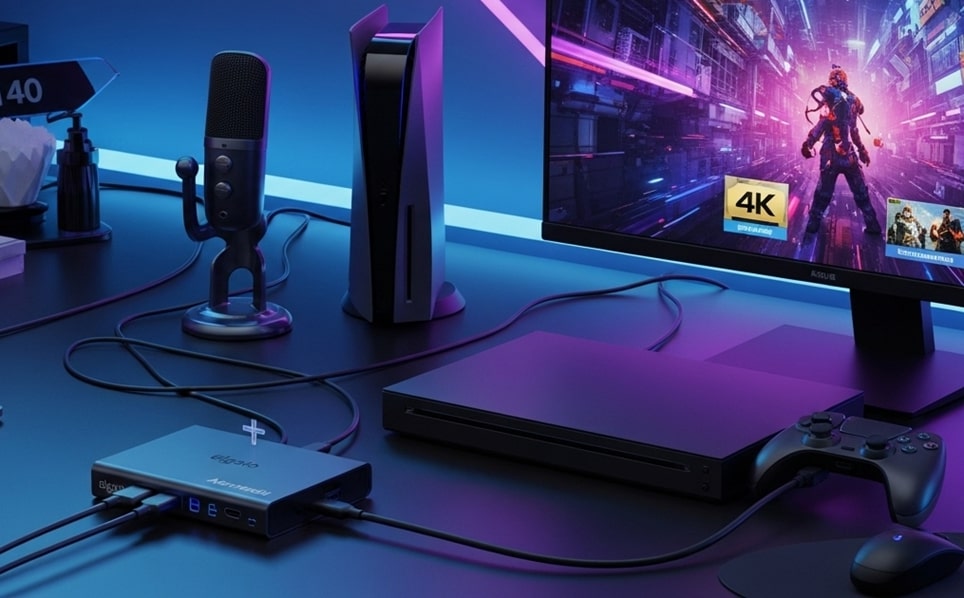
The core function of a capture card is to intercept and digitize video feeds, typically via HDMI inputs, allowing users to record or stream without compromising performance on the source device. For gamers, this means playing on a console like the PS5 or Xbox Series X while simultaneously sending footage to a PC for encoding and upload. Beyond gaming, professionals in video production use them to integrate DSLR footage or live events into editing suites. Recent advancements in 2025 have focused on reducing latency to mere milliseconds and supporting higher resolutions like 4K at 144Hz, making these devices more versatile than ever.
Understanding the distinction between internal and external capture cards is crucial for beginners. Internal models, which slot into a PC’s PCIe interface, offer superior bandwidth for uncompressed captures, ideal for stationary setups. External variants, connected via USB-C or Thunderbolt, provide portability and ease of use, perfect for multi-device environments. According to industry reports from early 2025, external cards dominate the market due to their plug-and-play compatibility with laptops and consoles, accounting for over 70% of sales in consumer segments.
One of the most compelling aspects of capture cards is their role in enhancing stream quality without taxing your hardware. Traditional screen recording software on a single PC can lead to dropped frames or reduced in-game performance, as the CPU and GPU juggle rendering, encoding, and displaying simultaneously. A capture card offloads this by handling the initial signal conversion, allowing your streaming PC to focus solely on compression and broadcast. This setup is particularly beneficial in dual-PC configurations, where one machine handles gameplay and the other manages the stream, resulting in smoother outputs even during intensive titles like Cyberpunk 2077 or Black Myth: Wukong.
Do you actually need a capture card? The answer hinges on your specific use case. For PC gamers streaming directly from their rig, built-in tools like NVIDIA ShadowPlay or AMD ReLive often suffice, eliminating the need for additional hardware. However, console enthusiasts or those incorporating external cameras will find capture cards indispensable. Recent surveys from streaming communities indicate that 85% of console-based creators rely on them for professional-grade results, especially when aiming for HDR10 support or multi-source overlays.
When evaluating necessity, consider your upload bandwidth and target resolution. Most home internet connections cap at 1080p60 for reliable streaming, but with fiber optics expanding globally, 4K adoption is rising. A capture card ensures you’re future-proofed, capturing in higher specs for post-production editing or archiving. In 2025, the global capture card market is valued at around $800 million, projected to grow at a 12% CAGR through 2033, driven by the surge in live streaming and content creation.
Delving deeper into how capture cards operate, the process begins with signal ingestion. An HDMI source from a console or camera feeds into the card’s input port, where it’s decoded from its native format—often uncompressed YUV or RGB—into a streamable digital signal. Modern cards employ hardware accelerators like HEVC chips for efficient compression, minimizing CPU load during transfer via USB 3.1 or PCIe 4.0. This low-latency passthrough feature is a game-changer, allowing gamers to monitor gameplay on a display at full resolution and refresh rate without perceptible delay, typically under 50 milliseconds.
Software integration is another key pillar. Capture cards pair seamlessly with OBS Studio, Streamlabs, or XSplit, appearing as a video capture device source. In OBS, users can fine-tune settings like deinterlacing for broadcast signals or color space conversion for HDR workflows. For advanced users, 2025 models support direct integration with cloud encoding services, enabling hybrid setups where initial capture happens locally before upload to platforms like AWS for final processing.
The evolution of capture cards in 2025 reflects broader tech trends. HDMI 2.1 compatibility now standardizes support for 8K passthrough and Variable Refresh Rate (VRR), reducing screen tearing in high-frame-rate gaming. AI-driven features, such as auto-framing for multi-camera streams or noise reduction in audio capture, are emerging in premium models from brands like Elgato and AVerMedia. Market data shows a 34% increase in 4K-capable cards launched this year, catering to the 41% adoption rate in gaming sectors.
Key Specifications to Consider When Choosing a Capture Card
Selecting the right capture card requires balancing performance metrics with your setup’s constraints. Resolution and frame rate top the list, as 4K60 capture is now baseline for professional streams, but 1080p240 options excel for esports titles demanding high refresh rates. Latency, measured in milliseconds, should ideally stay below 100ms for competitive play; newer USB-C 3.2 cards achieve this through dedicated ASICs.
Audio handling is equally vital, with embedded HDMI audio extraction supporting up to 7.1 surround sound. Look for cards with separate 3.5mm inputs for microphones or mixers to layer commentary without sync issues. Compatibility extends to OS support—Windows 11 and macOS Sonoma dominate, but Linux users benefit from UVC-compliant models for driverless operation.
Power delivery via USB bus power simplifies setups, avoiding external adapters, while bitrate limits—up to 140Mbps in top-tier cards—ensure artifact-free recordings. Finally, software ecosystems matter: Elgato’s 4K Capture Utility offers standalone recording, whereas AVerMedia’s RECentral includes scene transitions for polished streams.
Top Capture Cards for Different Budgets and Use Cases in 2025
The capture card landscape in 2025 offers options across price points, from budget-friendly entry-level devices to pro-grade internals. For beginners dipping into console streaming, external USB models provide the easiest entry, while power users opt for PCIe cards in dual-PC rigs. Below is a curated list of standout models, each evaluated for real-world performance in gaming and production workflows.
- Elgato HD60 X (Best Overall for Beginners): This external USB-C card captures at 1080p60 HDR with 4K30 passthrough, making it ideal for PS5 or Xbox Series X streams. Its plug-and-play setup integrates flawlessly with OBS, requiring no drivers on Windows or Mac, and delivers under 60ms latency for responsive gameplay. Priced around $180, it supports VRR to eliminate tearing, earning praise in reviews for its compact design and reliable HDR color accuracy during extended sessions.
- AVerMedia Live Gamer Ultra S GC553Pro (Best Value 4K External): Supporting 4K60 HDR capture and 4K144 passthrough, this card excels in high-res workflows without breaking the bank at $250. It uses HDMI 2.1 for future-proofing against 8K sources and includes RECentral software for instant highlights. Testers note its zero-frame dropouts in 144Hz esports titles, making it a staple for mid-tier creators balancing quality and portability.
- NearStream CCD30 (Best Budget 4K Option): At under $100, this USB 3.1 card offers 4K60 capture with HDR10, rivaling pricier rivals in plug-and-play ease. It shines in laptop-based streaming, powering directly from the port without external PSU, and handles multi-source overlays via OBS. Recent benchmarks highlight its near-zero latency on PS5, ideal for entry-level Twitch users seeking pro visuals on a shoestring budget.
- Elgato 4K60 S+ (Best for Standalone Recording): Featuring an HEVC encoder for lossless 4K60 captures to internal storage, this external powerhouse at $400 bypasses PC dependency for on-the-go events. It supports 240fps at 1080p for slow-motion clips and integrates with Elgato’s ecosystem for seamless editing. Professionals laud its artifact-free output in broadcast tests, though it demands Thunderbolt 3 for peak performance.
- AVerMedia Live Gamer Bolt (Best Low-Latency Pro Card): This Thunderbolt 3 external delivers 4K60 HDR with just 2ms added latency, perfect for competitive streaming at $550. It captures 1080p240 for buttery-smooth action and includes AI noise suppression for crystal-clear audio. High-end users appreciate its PCIe-like bandwidth in portable form, enabling uncompressed feeds for color grading in DaVinci Resolve.
- Rode Streamer X (Best Audio-Focused Hybrid): Combining capture with a pro audio interface, this $300 external handles 4K30 capture alongside XLR inputs for broadcast-quality sound. It supports 1440p120 passthrough for modern monitors and bundles Rode Central software for real-time mixing. Streamers with podcast elements praise its low-noise floor and easy integration with Streamlabs for layered productions.
- Elgato 4K Pro MK.2 (Best Internal PCIe for Dual-PC): Installed via PCIe 4.0, this $250 internal card captures 4K144 HDR with unlimited bitrate, offloading encoding entirely from your GPU. It excels in two-PC setups, feeding clean signals to a dedicated streaming rig, and supports AV1 decoding for efficient workflows. Benchmarks show zero performance hit on RTX 40-series cards, making it indispensable for ultra-high-res streams.
These selections reflect 2025’s emphasis on HDMI 2.1 and AI enhancements, with external cards comprising 70% of shipments due to hybrid work trends. For handheld gaming like Nintendo Switch, compact docks like AVerMedia’s Elite Go add capture without bulk.
Setting Up Your Capture Card: A Step-by-Step Guide
Installation varies by type but starts with hardware connections. For external cards, plug the HDMI output from your console into the card’s input, then route the card’s HDMI output to your monitor for passthrough. Connect via USB-C to your PC, ensuring a 3.1+ port for bandwidth. Power on your source device—HDCP handshake may take seconds—and verify signal in device manager.
Software setup follows: Download manufacturer tools like Elgato’s 4K Utility for calibration, then add the card as a source in OBS under “Video Capture Device.” Set resolution to match your source (e.g., 2160p60 for 4K) and enable deinterlace if needed for legacy signals. Audio sync is automatic via embedded HDMI, but test with a clap for lip-sync adjustments.
For internal PCIe cards, power down your PC, insert into a free slot, and boot to install drivers. Use BIOS to enable Resizable BAR for optimal throughput. In dual-PC streams, connect the gaming PC’s HDMI splitter to the capture PC, configuring OBS scenes for overlays like chat or alerts.
Troubleshooting common issues enhances reliability. Black screens often stem from HDCP blocks—use a stripper dongle for protected content. Dropped frames signal USB overload; switch ports or use a powered hub. Overheating in prolonged sessions? Ensure ventilation, as 2025 cards like the GC553Pro include thermal throttling alerts.
Advanced configurations unlock creative potential. Multi-card setups via USB switches allow scene transitions between cameras and gameplay. For 360-degree streams, pair with VR sources supporting equirectangular projection. Cloud integration, via APIs in newer cards, enables direct uploads to YouTube, bypassing local storage limits.
Capture Cards vs. Software-Only Encoding: A Comparative Analysis
While software like OBS handles encoding admirably, capture cards shine in hardware offloading. Software encoding relies on CPU/GPU resources, potentially dropping frames in demanding games—NVIDIA’s NVENC mitigates this but caps at 8K30. Cards, conversely, preprocess signals, freeing 20-30% more GPU headroom for ray-traced titles.
In single-PC setups, built-in tools suffice for 1080p, but dual-PC with a card yields 4K streams without stutter. Latency comparisons show cards at 50ms vs. software’s 100ms+, crucial for reactive genres. Cost-wise, a $200 card amortizes over years, versus upgrading to a $1,000 GPU for similar encoding prowess.
- Performance Efficiency: Capture cards reduce CPU usage by 40% in benchmarks, enabling smoother multitasking like browser sources. This is vital for variety streamers layering music visuals or polls. Software struggles here, often requiring preset downgrades to maintain 60fps.
- Signal Quality: Hardware conversion preserves dynamic range in HDR10, avoiding software’s compression artifacts. Tests on 4K footage reveal 15% sharper edges with cards. For colorists, uncompressed PCIe inputs retain 10-bit depth, essential for grading in Premiere Pro.
- Compatibility Scope: Cards bridge non-PC devices seamlessly, unlike software limited to display capture. This expands to DSLRs via clean HDMI, supporting 4K120 for cinematic clips. Software alternatives like window capture falter on exclusive fullscreen modes.
- Scalability: Modular cards scale to multi-input via daisy-chaining, ideal for events. Software hits bottlenecks at 4+ sources, demanding beefier RAM. In 2025’s edge-computing trend, cards with onboard AI upscale low-res feeds automatically.
- Cost-Effectiveness Long-Term: Initial investment yields ROI through durable builds—many last 5+ years. Software updates are free but tie to OS lifecycles. For pros, cards’ firmware upgrades add features like AV1 support without hardware swaps.
- Portability Factor: External cards travel easily for LAN parties, unlike software tethered to one machine. Battery-powered models like NearStream’s endure 8-hour streams. Software on laptops throttles under thermal limits, capping frame rates.
Hybrid approaches blend both: Use cards for capture, software for effects. This yields pro results without full hardware overhauls.
Beyond Gaming: Capture Cards in Professional Workflows
Capture cards transcend gaming into corporate and creative realms. In video conferencing, they convert HDMI from projectors for virtual whiteboards in Zoom, supporting 4K for remote teams. Medical imaging leverages low-latency cards for real-time ultrasound feeds into EHR systems, complying with HIPAA via encrypted streams.
Educators use them for lecture captures, integrating document cameras with slides in Moodle uploads. The 28% adoption in education per 2025 stats underscores this shift. Broadcasters employ multi-channel cards for OB vans, syncing SDI inputs to IP workflows for 5G transmission.
Content creators in vlogging repurpose cards for multi-cam shoots, timestamping clips for Adobe Premiere timelines. With 32% market share in broadcasting, cards like Blackmagic’s DeckLink handle 12G-SDI for cinema-grade 8K.
Emerging trends include AI integration for auto-editing highlights or object tracking in security feeds. The PCIe market, at $500 million in 2025, grows 10% annually via edge AI, processing feeds onsite to cut cloud costs.
Sustainability enters the fray, with eco-friendly cards using recycled plastics and low-power chips, aligning with green production mandates. Modular designs allow upgrades, reducing e-waste.
Future-Proofing Your Setup: Trends Shaping Capture Cards in Late 2025
As 2025 closes, AV1 codec adoption slashes bandwidth by 30% for 4K streams, embedded in cards like Elgato’s latest. 8K capture emerges for niche VR, though 4K remains dominant at 41% of launches. Wireless HDMI prototypes hint at cable-free setups, pending FCC approvals.
Market forecasts peg $2.1 billion by 2033, with Asia-Pacific leading at 33% share via esports booms in China. Integration with AR glasses for mixed-reality streams tests boundaries, capturing spatial audio alongside video.
Security enhancements like TPM chips protect against HDCP cracks, vital for licensed content. User data shows 23% prefer plug-and-play, driving miniaturized designs.
Customization via SDKs empowers devs to script card behaviors, like auto-muting on silence. This democratizes pro tools for indie creators.
Conclusion
Capture cards stand as indispensable allies in 2025’s content ecosystem, bridging hardware limitations to unlock pristine video capture across gaming, production, and beyond. Whether offloading encoding for fluid streams or enabling multi-source creativity, their value shines brightest in console and dual-PC realms, where software alone falters. As advancements like AI processing and AV1 efficiency propel the market toward $2.1 billion by 2033, investing in a compatible model future-proofs your workflow against rising resolutions and platforms. Ultimately, assess your setup’s demands—budget entries like the NearStream CCD30 suit casuals, while pro picks like the AVerMedia Bolt elevate ambitions. With thoughtful selection and setup, a capture card transforms raw footage into compelling narratives, empowering creators to captivate audiences worldwide.
